Modern technology has made it easier for both customers and business owners to not only access but also take advantage of what the online market has to offer. Selling and buying products have become easier and more efficient today. As a business owner, you can reach more people and increase your sales by joining the e-commerce community.
If your local market is already saturated, the global market is where the real headroom is, and the numbers back that up. According to Statista’s research on cross-border e-commerce, the business-to-consumer segment of cross-border online retail has surpassed the one trillion dollar mark for several consecutive years, and that growth shows no sign of slowing.
The behavioral data is just as telling. A majority of online shoppers now report buying from retailers based outside their own country at least occasionally, and a clear majority say they would rather shop on a site available in their native language than struggle through one that is not. Both of these facts point to the same conclusion: language and payment localization are not nice-to-haves for a global store. They are the difference between a visitor who buys and one who leaves within seconds of landing on a page they cannot comfortably read or pay on.
With the right tools and skills, you can build on this momentum rather than compete against it. For that to happen, you will need a good website, which will act as your online store, and you will need to make a handful of deliberate decisions early that are much harder to unwind later.
1 Do a proper analysis of supply and demand
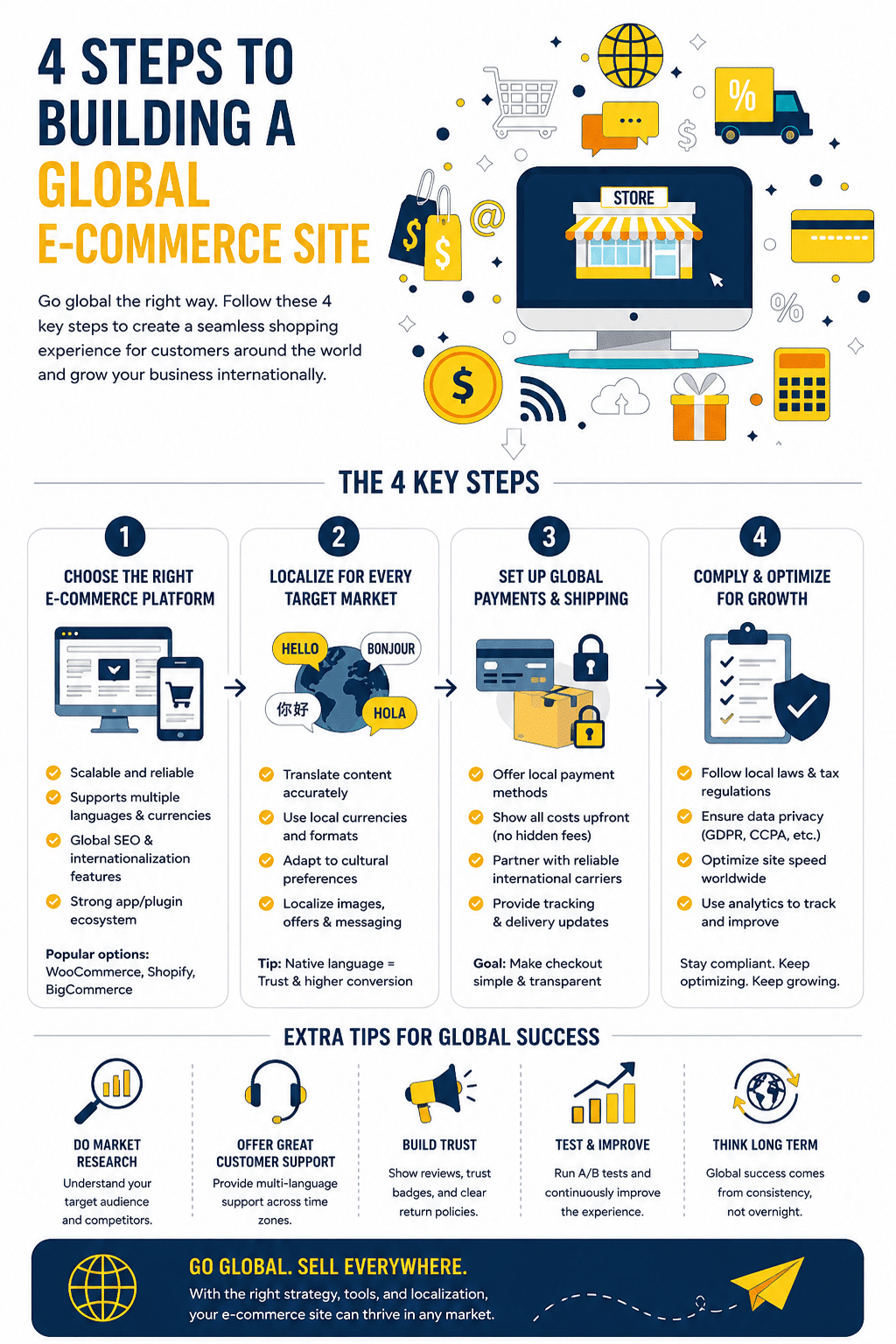
A successful e-commerce enterprise isn’t all about a having a nice-looking website. Of course, that plays a role, but there is more to this business than just great web design strategy. You’ll need to assess where you have the highest chances of success across the globe using the e-commerce site.
If you have several countries in mind, you can conduct a local analysis on various aspects on your business. Among the main factors to include in your research are competition, customer behaviour, product or service demand, and the pricing. Based on the results, you’ll know where you’re likely to attract more customers.
For example, a country where there are many local competitors within your field might not be your best bet. You’ll need to find a region where the supply-and-demand dynamics can favour the introduction of your product.
Knowing that you need to research competition, customer behavior, demand, and pricing is the easy part. Knowing how to actually gather that information without hiring a market research firm is where most first-time global sellers get stuck.
A few practical starting points cost nothing and take an afternoon, not a quarter.
Google Trends lets you compare search interest for your product category across countries directly, which is a fast way to rule markets in or out before investing further research time. Think with Google’s Market Finder tool goes a step further, suggesting countries based on your existing product and giving a rough estimate of demand and competition level for each.
Checking how your product category is represented on major regional marketplaces tells you something Google Trends cannot. If a product category barely exists on a country’s dominant marketplace, that can mean an open opportunity or it can mean the demand simply is not there yet. Reading the existing listings and their review counts in that category gives you a reasonably fast read on which explanation is more likely.
Pricing research matters just as much as demand research. A product that is profitable at your home market price point may not clear local price expectations once you account for local purchasing power, shipping, and any import duties the customer will see at checkout. Spend time on competitor sites in your target country specifically to see what comparable products actually sell for there, not what they sell for in your home market.
2 Sync your solutions with the local preferences
One of the main reasons why many e-commerce businesses have failed in the global market is lack of proper localization. You ought to keep in mind that every country has a unique set of preferences. As such, how you present a given product in your home country might not work in other regions.
As you think of building your global e-commerce website, be sure to keep the unique features of your new market in mind. Localization in this case isn’t just about making the product meet the needs of your new customers. It should also apply to the presentation of you website.
Among the most important features to remember when localizing your site is that language is only the first layer. Getting this right involves three separate decisions, and treating them as one task is where many global stores fall short.
Language quality matters more than language presence. Machine translation plugins can get a site online in multiple languages quickly, but unedited machine translation often produces phrasing that reads as obviously foreign to a native speaker, which undercuts the trust you are trying to build. Reviewing machine-translated product pages and key conversion pages with a native speaker, or paying for professional translation on your highest-traffic pages specifically, closes most of that gap without translating your entire catalog by hand. Proper technical setup matters too: hreflang tags tell search engines which language version of a page to show to which audience, and getting this wrong can cause the wrong language version to rank in the wrong country.
Currency display is the second layer. Showing a price in a visitor’s local currency, even if the actual transaction settles in your home currency, removes a significant amount of friction and mental math from the buying decision. WooCommerce stores can add this through currency switcher plugins that detect a visitor’s location and display localized pricing automatically.
Payment method preference is the third layer, and it varies by region more than most first-time global sellers expect. Credit cards dominate in the United States, but digital wallets are now the leading cross-border payment method globally, and buy-now-pay-later options have become a default expectation in several markets rather than a nice extra. Reviewing payment gateway options built for international transactions before launch, rather than defaulting to whatever your home-market processor happens to support, prevents a checkout abandonment problem you would otherwise only discover after launch.
For a deeper, more technical breakdown of how to handle hreflang structure, regional keyword research, and search engine variations like Baidu and Yandex, the ecommerce SEO best practices for international markets guide on this site covers the search side of localization in detail and pairs directly with the steps in this article.
3. Choose the right ecommerce platform for global selling
Before you hire anyone to build anything, decide what you are building it on. This decision shapes almost everything downstream, including how easily you can add languages and currencies later, so it deserves its own step rather than being an afterthought during development.
WooCommerce, the ecommerce plugin built for WordPress, is a strong fit if you want full ownership of your store’s design and data, and if you already have or plan to build your site on WordPress. It is open source, so there is no monthly platform fee beyond hosting, and a mature ecosystem of plugins handles the specific needs of global selling: currency switching, regional tax calculation, and multilingual content management through tools like WPML or Weglot. The tradeoff is that you are responsible for choosing good hosting and keeping the stack updated, since WooCommerce itself is a plugin rather than a fully managed service.
Shopify takes the opposite approach. Hosting, security, and infrastructure are handled for you, and Shopify Markets specifically targets global sellers with built-in multi-currency pricing, localized domains, and duty and tax calculation at checkout. The tradeoff is an ongoing monthly fee plus transaction costs if you do not use Shopify’s own payment processing, and less flexibility if you want a highly customized design.
BigCommerce sits between the two, offering native multi-currency support and strong API access for businesses that expect to integrate with other systems like ERP or inventory management as they scale, though its market share and plugin ecosystem are smaller than either WooCommerce or Shopify.
For a business already comfortable with WordPress, or one that wants long-term control over its store without recurring platform fees, setting up an online store with WooCommerce is usually the more cost-effective starting point for global expansion. For a business that wants the infrastructure handled and is willing to pay for that convenience, Shopify Markets is purpose-built for exactly this use case.
4 Find a good web developer
Once you’ve figured out where you’re going to target and how to meet the demands of your new customers, you can now go ahead and implement the project. Start by finding a web developer who will be able to deliver on your needs.
Make sure the professional you choose has direct experience building ecommerce stores rather than general-purpose websites, and check their previous work and client feedback before committing. Global stores carry specific technical requirements that a generalist may not have handled before: multi-currency checkout, language switching, regional payment gateway integration, and performance optimization for visitors connecting from different countries and network speeds. Ask any developer or agency you are considering to show you a previous global or multi-region store they have built.
Another thing to do at this web development stage is choosing the right hosting platform. It’s, therefore, imperative that you give the job to someone who has worked on e-commerce projects before. This way, they’ll be able to tell which hosting service providers are the best for your global e-commerce website.
After explaining your project to them, they’ll give you a breakdown of all the costs you should expect. If you don’t have a domain name already, then be sure to include it in the expenses. While at it, choose a domain name that not only describes your business but also makes it easier for your target market to remember.
5. Handle legal, tax, and compliance requirements
This is the step most first-time global sellers skip until it becomes an expensive surprise. Selling into a country triggers that country’s rules, not just your home country’s rules, and the gap between the two can be significant.
Value-added tax and goods and services tax registration thresholds vary by country, and many require registration once your sales into that market cross a set volume, even if you have no physical presence there. The European Union in particular has consolidated much of this into its VAT e-commerce package, but compliance still requires understanding which threshold applies to your situation and registering before you cross it, not after.
Customs duties and import taxes affect your customer’s experience directly. Shipping terms generally fall into two categories: delivered duty paid, where you collect and remit the duty at checkout so the customer’s price is final, and delivered at place, where the customer is billed for duty on arrival, which frequently causes shock, refusal of delivery, or chargebacks. Deciding which model you use, and communicating it clearly at checkout, prevents a substantial share of the customer service problems that sink first-time international sellers.
Data privacy law is the third area worth understanding before launch. If you collect any personal data from visitors in the European Union, GDPR applies regardless of where your business is based. Several other regions have since introduced similar frameworks. A basic, accurate privacy policy and a real cookie consent mechanism are not optional extras for a global store; they are baseline requirements in a growing number of the markets you are trying to enter.
None of this requires becoming a tax attorney. It does require either consulting one briefly before launch or using a tax automation tool built into your ecommerce platform that handles registration thresholds and calculation automatically. The cost of getting professional input upfront is consistently smaller than the cost of an unexpected compliance bill discovered after a year of sales.
6 Take your website live
Once the developer has designed your website and you’re satisfied with their work, you can the take your site live. Remember, even after a proper design job, you’ll still need to test your site and see if it serves the needs of your target customers.
Before you start listing your products, have the developer add “Homepage” and “About us” pages to make it functional. The next step is to reach out to bloggers who’ll create content for your site and influencers for marketing purposes. Negotiate deals with a few interested vendors and start your journey. Improve the quality of your site and slowly optimize it for SEO as you grow.
A global store has a performance problem a local store does not: physical distance. A server located in one region serves visitors in that region quickly and visitors on the other side of the world slowly, and that gap shows up directly in bounce rate and conversion, particularly on mobile connections.
A content delivery network solves most of this by caching your site’s static content on servers distributed around the world, so a visitor in Singapore loads a copy from a nearby server rather than waiting on a round trip to wherever your primary server sits. Setting this up is no longer a specialist task; most modern CDN options include a free tier that covers what a new global store needs at launch.
Hosting choice matters for the same reason. Managed WordPress hosting built around performance, rather than the cheapest available shared plan, tends to include CDN integration and server-level caching by default, which removes one more thing you would otherwise have to configure manually before launch.
Before listing your products, test your actual page load speed from outside your home country, not just from your own office connection. Free tools exist that simulate page loads from different global locations, and running this check before launch, rather than after your first wave of international visitors bounces, catches a problem that is otherwise invisible from where you are sitting.
Conclusion
Building a global e-commerce website requires a lot of work. You’ll need to assess the supply and demand dynamics of the target market then decide on the best region to set up your new business. Hiring a qualified developer is another key step to a successful e-commerce web design journey. Once the site is up and running, be sure to make gradual improvements in all areas for you to compete with the best in the industry.
Global ecommerce site FAQ
There is no single best answer; it depends on how much control you want versus how much you want handled for you. WooCommerce, built on WordPress, gives full ownership and no recurring platform fee, with a mature plugin ecosystem for currency switching and multilingual content, making it a strong fit for sellers who already use or are comfortable with WordPress. Shopify Markets is built specifically for global sellers and handles infrastructure, multi-currency pricing, and duty calculation natively, at the cost of an ongoing monthly fee. The right choice depends on your technical comfort level and whether you would rather pay for convenience or invest time for control.
Generally no. Most global stores run on a single platform with country-specific versions handled through subdirectories or subdomains, localized content, and automatic currency and language detection based on the visitor’s location. A fully separate website per country is usually only justified for very large enterprises with significantly different product lines or regulatory requirements by market.
This varies enormously based on scope. A basic setup using machine translation plugins and a currency switcher can be done for the cost of the plugins themselves, often under a few hundred dollars total. Professional translation of key pages, proper hreflang implementation, and region-specific payment gateway integration done by an experienced developer typically adds a meaningful project cost, but this investment usually pays for itself quickly once it removes friction at checkout for international visitors who would otherwise abandon the purchase.
Often yes, once your sales into that specific country cross a registration threshold, which varies by country and changes periodically. The European Union’s VAT e-commerce rules apply across all EU member states once certain volume thresholds are met, even without a physical presence there. This is genuinely one of the more complex parts of global selling, and a brief consultation with a tax professional familiar with cross-border ecommerce, or a tax automation tool built into your ecommerce platform, is worth the cost before you scale sales in a new market.
A hybrid approach usually works best. Automatic translation gets your full catalog online quickly and affordably, which matters when you are testing whether a market is worth investing in further. Once you see real traffic and sales from a specific country, reviewing and refining the translation on your highest-traffic and highest-converting pages, ideally with a native speaker, closes the gap between functional and genuinely persuasive copy in that language.
Most ecommerce platforms support this through either a built-in feature or a dedicated plugin. WooCommerce stores typically add a currency switcher plugin that detects visitor location and displays localized pricing, paired with a payment gateway that supports settlement in multiple currencies. Shopify Markets includes multi-currency pricing natively. Beyond currency display, also consider which payment methods are actually preferred in each target market; digital wallets dominate cross-border transactions in several regions, and offering only credit card payment can quietly cost you sales in markets where that is not the default choice.
Infographic