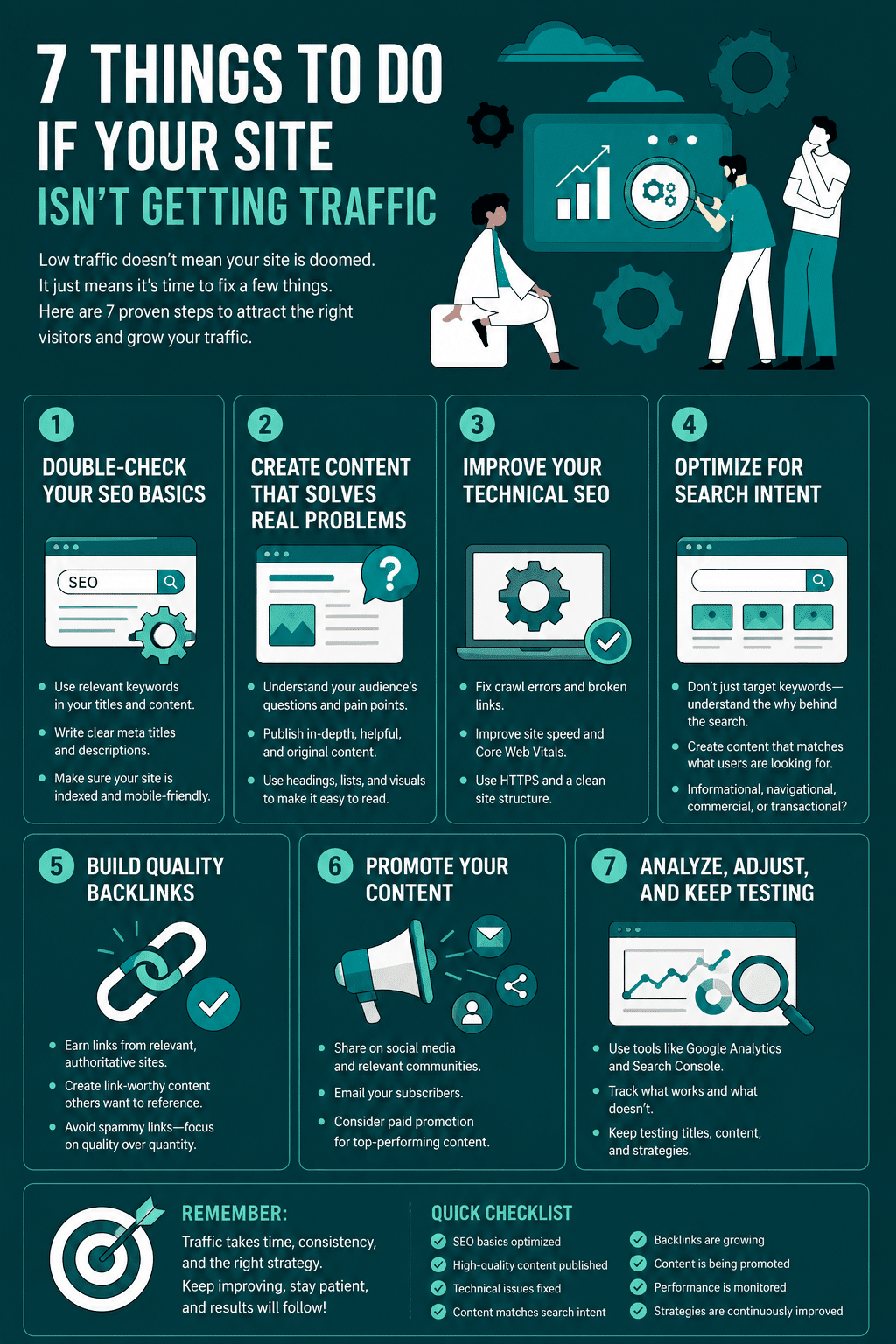
I get it, your site traffic is at an all-time low, which gives you a headache. I’d be sad, too, if I were in your shoes. But before you beat yourself up, know this: even the most popular websites today had spells of low traffic.
The internet is quite a competitive space, with many websites competing for the same audience. If you’re struggling to attract visitors, it’s not the end of the world. You simply need to fix some things.
In this post, we’ll show you a few things you can fix to get visitors to flock back to your website.
Before You Fix Anything: Diagnose What’s Actually Wrong
Every fix listed in this article is genuinely useful in the right situation. But applying the wrong fix to the wrong problem wastes weeks of effort. Before redesigning your site, building backlinks, or running ads, spend ten minutes finding out what is actually happening, because the answer determines which of the seven fixes below you should prioritize.
Step 1: Confirm Google has actually indexed your site
Type site:yourdomain.com into Google. If your pages do not appear at all, your traffic problem is not design, content, or backlinks; it is that Google does not know your pages exist or has chosen not to show them. This is one of the most common and most overlooked causes of zero traffic, and none of the seven tips in this article will help until it is resolved.
Google Search Console is the authoritative source for this. Once connected to your site, its Index Coverage report shows exactly which pages are indexed, which are excluded, and why. Common culprits include an accidental noindex tag left on after development, a robots.txt file blocking crawlers from important sections of the site (our guide on optimizing your WordPress robots.txt file covers exactly how to check and fix this), or a missing or broken XML sitemap, covered in our guide on why every site needs an XML sitemap. For a deeper technical understanding of how this entire process works, the guide to how search engine indexing actually works explains the crawling and indexing pipeline in more depth.
Step 2: Check impressions vs. clicks in Search Console’s Performance report
If your pages are indexed but traffic is still low, the next question is whether people are seeing your site in search results and not clicking (an impressions problem, usually meaning weak titles or meta descriptions, or a position too low on the page to get noticed), or whether your pages simply are not appearing for relevant searches at all (a content or relevance problem, usually meaning your content does not match what people are actually searching for).
High impressions with a low click-through rate points toward fixing your titles and meta descriptions first. Low impressions across the board points toward a content, keyword targeting, or backlink authority problem, which means the content and backlink fixes later in this article are where to focus.
Step 3: Rule out a manual action
Within Search Console, the Security & Manual Actions section will flag it directly if Google has penalized your site for a policy violation. This is less common than the issues above but worth a thirty-second check, since no amount of design or content work fixes a site under an active manual action until the underlying issue is resolved and a reconsideration request is filed.
Once you know which of these three categories describes your actual situation, the seven fixes below become much more targeted. A site with an indexing problem should prioritize fix 1 and the technical side of this diagnostic section. A site with a content relevance problem should prioritize fixes 4 and 7. A site that is indexed, relevant, and still struggling should look harder at fixes 2, 3, and 5 for audience discovery.
A 2026-Specific Cause Worth Checking: AI Overviews and Zero-Click Search
If your traffic has declined even though your rankings in Google Search Console look unchanged, there is a structural cause that did not exist when this article was first published: AI Overviews.
Independent research has found that the presence of an AI Overview reduces click-through rate on traditional organic results from roughly 15 percent down to around 8 percent, and that approximately 60 percent of searches now end without any click at all, as users get their answer directly from the AI-generated summary at the top of the page. This is not a penalty or anything you did wrong; it is a structural shift in how a meaningful share of search traffic now behaves.
The practical implication is that ranking well is no longer sufficient on its own for informational queries where an AI Overview can fully answer the question without a click. The most resilient strategy is shifting some content toward queries with stronger commercial or transactional intent, where AI Overviews appear less frequently, and building genuine authority and citation-worthy content that AI systems are more likely to reference (and ideally link back to) rather than fully summarize. Our broader guide to the current digital marketing landscape, including how AI Overviews are reshaping search strategy, covers this shift in more detail alongside the other major changes affecting traffic in 2026.
7 Things To Do If Your Site Isn’t Getting Traffic
INTERNAL FIXES
Before we start talking about getting traffic, it’s important to first address the real reason your site isn’t getting traffic in the first place.
1 – Revamp your web design
No matter the age, every site must have had visitors at some point. Even if it’s only a few hundred, the initial launch marketing must-have lured some people in. So, let me ask you, why do you think your first-time visitors never came back?
My guess is your site’s content/design wasn’t appealing enough. For today’s users, if a website isn’t good enough (design and content-wise), you can bet they will never return to the site.
And that’s not even the worst part. Search engines follow human signals like time spent on site (also called session duration) and bounce rate to determine whether a site is good or not. So when they sense that a site isn’t pleasing users, they deny the site placement on their platform – the SERP.
In light of this, the first step in bringing visitors back to your site is to hire a web designer to revamp it into something more user- and search engine-friendly.
You might want to check out web designs that attract your target niche. It won’t be practical that, as the owner of the site, you’ll pick what you think is best just because you like it. You’ll have to follow what your audience likes. So, if your target niche is the younger population, trendy and fresh web design will be best. But, if your audience is executives, a more streamlined and clean-looking web design would be suitable.
EXTERNAL FIXES
Now that your site is fixed, it is time to start bringing traffic from everywhere possible using the tips below.
What “Revamp Your Web Design” Actually Means in Practice
Redesigning a site is not just a visual exercise. Two technical factors matter as much as aesthetics, and both are measurable rather than subjective.
- Page speed and Core Web Vitals. Google uses Core Web Vitals, a set of measurable performance metrics covering loading speed, interactivity, and visual stability, as a ranking factor. A beautiful redesign that loads slowly can perform worse than a plainer site that loads fast. Test your current site with Google’s PageSpeed Insights before and after any redesign to confirm the change is actually an improvement, not just a different look. Our beginner’s guide to technical SEO covers the specific technical factors, including speed and mobile usability, that affect both rankings and how users behave on your site once they arrive.
- Mobile-first design is not optional. Google indexes and ranks the mobile version of your site as the primary version, not the desktop version, for the vast majority of websites. A redesign that looks great on desktop but is difficult to use on a phone will underperform regardless of how polished the desktop version is. Our guide to mobile-first WordPress design covers what this actually requires in practice.
Beyond the visual and technical layers, site architecture, meaning how your pages are organized and linked to each other, also directly affects both how easily visitors find what they need and how effectively search engines understand your site’s structure. Our guide on how UX design and site architecture shape SEO covers this connection in more depth.
2 – Optimize your Google Business Profile
If you haven’t taken local SEO seriously, now is the time to change that. Whatever business you’re in, there are local audiences in your jurisdiction seeking your kind of products or services.
This audience group represents an untapped traffic goldmine you need to exploit. And the way to do that is through Google Business Profile.
Setting up a GBP profile is quite simple. Just like signing up on Facebook or Instagram. With your GBP page, people looking for your products or services can find you easily anytime they search on Google.
Google Business Profile in 2026: Beyond the Basic Listing
Google renamed this product to Google Business Profile (GBP) in 2021, and the platform has gained meaningful functionality since the basic listing setup this article originally described.
Beyond simply creating a profile, an active Google Business Profile includes several features that directly affect local visibility: Google Posts, which let you publish short updates, offers, and events directly to your listing; a Q&A section where you can proactively answer common customer questions before they are asked; and a review response feature, where responding to every review, positive or negative, signals to both customers and Google that the business is actively managed. Profiles that are updated regularly with posts and photos consistently outperform static, “set and forget” listings in local search visibility, since Google’s local ranking factors explicitly reward signals of an active, well-maintained business.
3 – A Better Approach Than Mass Directory Submission
Submitting your business to dozens of generic directories was a popular SEO tactic over a decade ago, but its value has declined substantially since then. Google has long since deprioritized generic, low-quality directory links as a ranking signal, and several of the once-prominent general directories have seen their own traffic and relevance decline significantly.
A more effective approach in 2026 prioritizes quality and consistency over volume:
- NAP consistency matters more than directory count. Your business Name, Address, and Phone number (NAP) should be identical, character for character, across every listing. Inconsistent formatting across directories is a genuine local SEO problem, more so than simply having fewer listings.
- Prioritize the handful of directories that still carry real authority and traffic: Google Business Profile (covered above), Yelp, the Better Business Bureau for businesses where trust signals matter, and any directory specifically relevant to your industry, such as Avvo for legal services, Healthgrades for healthcare, or Houzz for home and design businesses. Industry-specific directories with genuinely active users in your niche are worth significantly more than broad submissions to general-purpose directories that most of your customers no longer use.
- Treat directory listings as a small, supporting tactic, not a primary traffic strategy. The fixes covered elsewhere in this article, particularly fixing indexing issues, building genuine backlinks, and creating useful content, will move the needle on traffic far more than directory submissions in 2026.
4 – Start gathering backlinks
Backlinks are links from other websites to your website. If your site isn’t getting traffic, hunting for backlinks can be a wise move.
Backlinks bring new traffic to your site in two ways. Firstly, it attracts visitors from other websites to your website. Secondly, it helps search engines rank you higher in their SERPs.
There are many ways to gather backlinks for your site. But the simplest and fastest way is to create high-quality, link-worthy content. Then, you can publish such content on your site or post it on other people’s pages as guest posts.
Additionally, backlinks help by allowing search engines to know your website’s value since you’re linked to a higher authority site.
Building Backlinks the Right Way in 2026
The original guidance to create link-worthy content and pursue guest posting is the right starting direction, but it is worth being specific about what actually works and what to avoid.
Effective approaches include digital PR (creating genuinely newsworthy research, data, or tools that publications want to cover and link to), contributing expert commentary to journalist source-request platforms, building relationships with sites in your specific niche rather than mass outreach, and creating resources so useful that other sites link to them voluntarily without being asked.
One approach worth avoiding entirely is purchasing links, including the common but risky practice of paying for backlinks even when the anchor text used is your own brand name, since Google’s guidelines treat paid links that pass ranking credit as a violation regardless of how natural the anchor text appears. Our detailed guide on whether branded backlinks are actually worth pursuing covers exactly this distinction, including which paid placement practices carry real risk and which earned-media alternatives deliver more durable results. For a broader, structured approach to managing backlink and SEO efforts over time, our comprehensive guide to SEO campaign management covers how backlink building fits into a complete strategy.
5 – Leverage social media if your site isn’t getting traffic
Gone are the days when social media posts are only shown to one’s followers. Social media ads allow your content to be projected in front of non-followers.
If you’re seeking site traffic, all it takes is a simple Facebook or Instagram campaign to get your brand name in the faces of your target audience. The only obstacle that may stop these prospects from coming back, again and again, is if your site isn’t appealing enough.
Besides the two platforms mentioned, you can run important traffic-attracting ad campaigns on LinkedIn, TikTok, Whatsapp, Pinterest, Twitter, and many other social media platforms.
It’d also be great to know that some of these social media platforms are interlinked, and one campaign you’ll invest on one platform will be shown in another. So, it’d be best to choose where to launch your campaign so you’ll get the best out of your investment.
6 – When Paid Ads Make Sense, and When They Do Not
Paid advertising can deliver fast, reliable traffic, and for businesses with the budget and a clear understanding of their numbers, it is a legitimate tool. But it is worth being precise about what paid ads actually fix and what they do not.
Paid ads buy visibility. They do not fix an unindexed site, a confusing user experience that drives visitors away the moment they arrive, or content that does not actually answer what your audience is searching for. Running ads to a site with one of the underlying problems covered in the diagnostic section above means paying for traffic that will bounce immediately, which is an expensive way to discover a problem that a free Search Console check would have revealed first.
For businesses with a validated offer, a functioning site, and a clear target cost per acquisition they can afford, paid ads are a genuinely effective way to accelerate traffic while organic strategies, which typically take months to show results, build in the background. The right sequence for most sites with a real traffic problem is: diagnose and fix the underlying issue first, then use paid ads to accelerate growth on a foundation that can actually convert the traffic it receives.
7 – Create useful niche-specific tools and materials
You can bring traffic to your site by offering prospects something they can’t easily find elsewhere.
For example, if you’re a mortgage business website, you can offer a calculator that does certain mortgage-related calculations. You can create a free domain name suggestion tool if you’re an SEO agency. If you’re an HR-based blog, you can create a free CV template that people can download for free.
And, when you’ve chosen the niche-specific tool you’d like to offer your audience, you can try to use templates as templates can speed the process up. Watch your site traffic go up and your bounce rate go to its lowest as more people spend time doing creative and useful stuff on your website. When people realize that your site is useful and offers something valuable, they can spread the word by sharing your posts and reacting on your social media.
A good example of someone who does this well is Neil Patel. The popular digital marketer has a free keyword research tool he calls Ubersuggest. This tool helps fellow marketers, bloggers, and webmasters perform simple keyword research and analysis.
How does this bring traffic to his site, you may wonder? First, many bloggers reference this tool in their blog posts, which sends traffic to Neil’s page. Another way is when people go online to look for a free keyword research tool, they find Neil’s tool and enter his site.
Frequently Asked Questions About Low Website Traffic
Sudden traffic drops typically fall into a few categories: a technical issue such as an accidental noindex tag, broken robots.txt, or site migration error that affected indexing; a Google algorithm update that changed how your content is evaluated; a manual action or penalty, visible in Google Search Console’s Security & Manual Actions section; or, increasingly in 2026, the growth of AI Overviews reducing click-through rates even when your rankings have not changed. Checking Google Search Console’s Performance report for the specific date the drop occurred is the fastest way to narrow down the likely cause.
Technical fixes like resolving an indexing issue can show results within days to a few weeks, since they primarily require Google to recrawl and reprocess your site. Content and backlink-based strategies typically take three to six months to show meaningful, compounding results, since they depend on building authority and relevance signals over time rather than correcting a single technical error. This is why diagnosing the actual cause of low traffic matters: a technical fix can show fast results, while content and backlink strategies require sustained effort before paying off.
This is one of the most common and most overlooked causes. Search site:yourdomain.com directly in Google to check quickly, or use Google Search Console’s Index Coverage report for a complete and authoritative view of which pages are indexed and why any pages are excluded. If your site is not indexed at all, none of the content, design, or backlink strategies covered elsewhere will generate traffic until the indexing issue is resolved.
Diagnose the underlying cause first, regardless of which channel you eventually prioritize. If the site has a technical or indexing problem, fixing that costs nothing and should always come first, since paid traffic sent to a site Google cannot properly evaluate, or that has a fundamental user experience problem, is traffic that converts poorly and wastes ad spend. Once the foundation is solid, the right balance between SEO and paid ads depends on your timeline and budget: SEO compounds over months but costs less ongoing spend, while paid ads deliver immediate traffic at an ongoing cost.
Their value has declined substantially compared to a decade ago, when mass directory submission was a popular and effective link-building tactic. Google’s algorithms have since deprioritized generic, low-authority directory links as a ranking signal. A small number of high-authority, genuinely relevant directories, including Google Business Profile, Yelp, and industry-specific directories where your actual customers are searching, still carry real value. Submitting to dozens of low-traffic generic directories primarily for link volume is no longer an effective strategy.
Build Your Own Free Tool
You, too, can create a similar niche-relevant tool for people in your industry. You can offer this tool to others in your industry for free. That way, traffic will be coming from their sites to yours.
Some interesting tool ideas include:
- Calculators, e.g., freelance rate calculator
- Planners, e.g., a to-do list for remote workers
- Templates for something, e.g., a business proposal template
- Generator for something, e.g., business name generator
Infographic