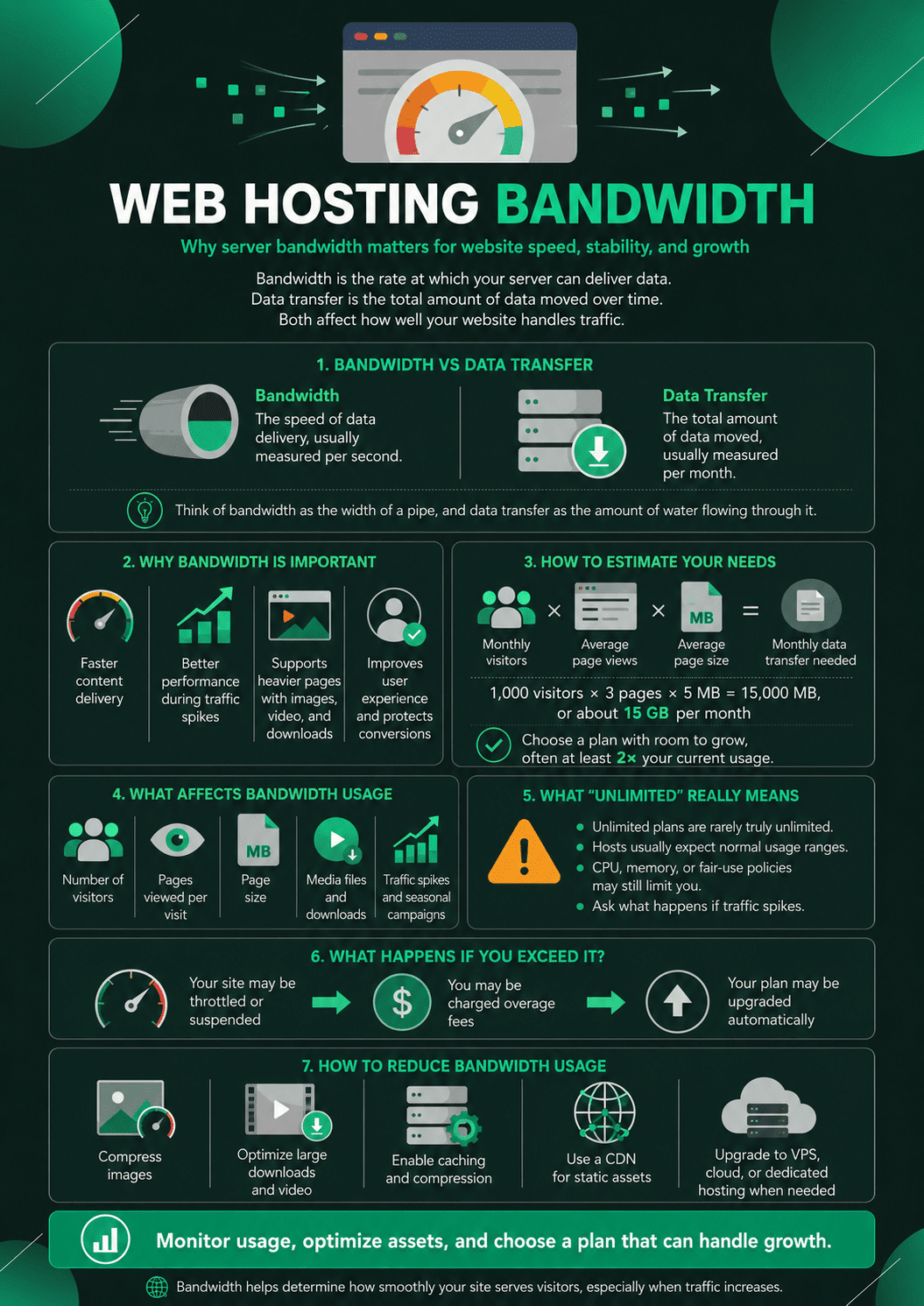
Web hosting bandwidth: Why is server bandwidth important for your website? When researching and choosing a host to host yours, one critical factor to evaluate and compare between hosting plans is the amount of bandwidth included.
Yes, it may offer “limited” hosting plans, but the closer you get, you will find that unlimited is unlimited, for having no penalties if you use too much based on a “usage,” whatever that means. But, unfortunately, knowing how much bandwidth your site needs is an art form.
Web Hosting Bandwidth and Data Transfer
Essentially, bandwidth is a term for calculating the rate of traffic and data allowed between users; and your website over the Internet. Unfortunately, the term “bandwidth” is often misused to describe “data transfer,” but they are two different things.
What is data download?
So, data transfer is the total amount of data to be transferred in a given time, with average values in months.
What is web hosting bandwidth?
Bandwidth is the full measure of data that can transfer in a given time, usually averaged in seconds.
The “data transfer” number tells you how much data you can transfer in a month. The number in “bandwidth” indicates how fast it can share data.
Imagine a bandwidth like the width of a water pipe where data transfer is the amount of water coming out of the line. The width of the water (bandwidth) determines how fast the water can flow (data). Fundamentally, data transfer is bandwidth consumption.
For website owners that a web host offers, the amount of bandwidth that a hosting company’s website can serve as a good one of that host’s capabilities; so, the higher the bandwidth, the better the speed, network; connectivity; and systems.
Why is bandwidth critical?
The available bandwidth determines how fast your website can deliver content to your visitors during peak traffic times. This is an essential part of growing your audience and increasing your sales.
Higher bandwidth allows website owners to have more dynamic features; and content on their sites, which may be more attractive to their visitors.
Unlimited Bandwidth vs Unmetered Bandwidth: A Difference That Matters
Many hosting providers use “unlimited” and “unmetered” as if they were the same thing. They are not, and understanding the distinction saves real frustration when your site grows.
- Unlimited bandwidth technically means there is no specific cap stated in your plan. In practice, as the article above explains, there are limits embedded in the terms of service, usually defined by CPU usage or “fair use” policies rather than a specific gigabyte number. If you consume more resources than the hosting provider considers normal for your plan tier, they will ask you to upgrade or temporarily throttle your site.
- Unmetered bandwidth means the hosting provider does not count or charge by the gigabyte of data transferred. The connection to the server has a defined speed (for example, 100 Mbps), and you can use that connection as much as you want within the defined speed. This is a more honest framing than “unlimited,” because it acknowledges that the physical connection has a real capacity, but it does not penalize you for total data volume.
What to look for when reading hosting plan specs:
If a plan says “unmetered bandwidth at 100 Mbps,” that tells you the connection speed and that you won’t be billed by the gigabyte. If it says “unlimited bandwidth” with no other context, ask the provider specifically what happens if your site experiences a significant traffic spike. The answer will tell you more than the marketing language.
For most new and growing websites, the distinction matters less than the hosting provider’s reputation for uptime and support quality. But for sites that expect irregular high-traffic events (seasonal promotions, viral content, product launches), knowing which category your plan falls into helps you plan accordingly.
So what about unlimited web hosting bandwidth/data transfer?
Many hosting organizations support cheap hosting plans that include “unlimited bandwidth.” For the buyer, this means they can run as much data; and traffic to the site as they need, with no limits. For the hosting provider, it means a way to give a buyer a fixed cost that usually works.
So, as always, the truth is somewhere in the middle.
It is simply impossible for hosting to offer a wide range of companies; it is too expensive to provide unrestricted access to all customers. However, most companies fall into the “normal range” of bandwidth usage by default, which hosting providers use when creating “unlimited” packages. So, by “unlimited” hosting providers catering to the majority of their customer base, there is a cap on a bandwidth extension included in the package cost; the trick is knowing what it is.
By comparing your site’s actual needs to the extent of the provider needed at that bandwidth, you can determine the quality level of hosting you need and whether a particular provider will meet.
How can I check my bandwidth?
You can quickly check your bandwidth by logging into your WordPress hosting account dashboard as a website owner.
So, in the control panel, you need to look for a section that allows you to view your site’s resource activity. And this will look a little different for each host. Some web hosts facilitate this by displaying an icon or link; so you can see how much bandwidth your site is using.
So, here is an example of what it looks like in the Bluehost control panel:
checking bandwidth
So, once you click on the bandwidth breakdown, it will show you trends broken down by periods to see how much bandwidth your site has used in the last 24 hours, last week, month, and year.
Bandwidth chart
What is unlimited server bandwidth?
So, just as there is no such thing as unlimited storage space on a server, there is no such thing as unlimited bandwidth.
Multiple shared hosting companies often offer unlimited bandwidth, domains, or disk space. Unfortunately, this is misleading because every web hosting provider has bandwidth limits on their packages.
And so why do web hosts advertise “unlimited bandwidth”? So, that’s because they know that, under normal circumstances, websites on a shared server will never use all the available bandwidth.
Instead of educating non-technical website owners about server bandwidth and deciding on bandwidth needs, hosting companies find it easier to say “unlimited bandwidth” because most small websites will never exceed the limit.
Not to mention that unlimited bandwidth sounds like a great deal. But what they’re not saying is that there are limits on how much server CPU (Central Processing Unit) your website can use.
If your site exceeds these limits, a web host may temporarily shut down your site during a peak in requests and may also ask you to upgrade to a higher plan.
And when shopping for a web host, you should pay close attention to those that offer unlimited bandwidth. In addition, it is advisable to ask about their CPU usage policies and what they will do if traffic spikes.
How much bandwidth do I need?
It would help if you found the plan with the proper bandwidth for your website.
And while it’s unnecessary to pay for more bandwidth than you need, not having enough can take your site offline.
So, the amount of bandwidth required depends on the number and size of your pages, the number of visitors your site receives, and the number of pages each visitor views.
If your site is new or doesn’t have a lot of content/visitors, you don’t need a lot of bandwidth. So, a basic shared hosting plan from SiteGround or Bluehost might be a great option, even if it says “unlimited bandwidth.”
But, if your site already has many users and has a lot of graphics, images, video, audio, downloadable content, and visitors, you need more bandwidth.
The easiest way to know how much bandwidth you will need for an existing website is to log into your host account and view the traffic reports in your cPanel. Almost all web hosts provide these types of reports.
If you’re not sure, you can work with a managed WordPress hosting provider, like WP Engine or Liquid Web, who can walk you through making the right plan decision.
So, even if you start with a smaller plan at the managed hosting provider, they will not shut down your site if your bandwidth exceeds. Instead, they notify you and make changes to improve their functionality so that visitors to your website always get the best user experience.
What happens if I exceed my bandwidth?
And, if you exceed your monthly bandwidth limit, one of three things usually happens: the host may suspend your site, charge you excess fees, or automatically upgrade your plan to the next version to have more bandwidth.
How can I reduce my bandwidth?
And so, if you’re not ready to upgrade your hosting package, consider reducing your website’s bandwidth. So, you can do this by compressing images and downsizing large downloads/videos on your site.
You’ll also need to think about enabling HTTP, CSS, and JavaScript compression using a caching plugin. So, you can also have your static content stored on a content delivery network (CDN) close to your audience, reducing server load.
If you’ve exceeded the limits of your need bandwidth from your existing hosting plan, consider upgrading to a VPS hosting package, dedicated hosting, or cloud hosting.
How a CDN Reduces Your Bandwidth Requirements
The single most effective technical step you can take to reduce the bandwidth load on your hosting server is to use a Content Delivery Network, or CDN.
What a CDN does for bandwidth
A CDN is a global network of servers, called edge nodes or Points of Presence (PoPs), distributed across multiple geographic locations. When a visitor loads your website, the CDN serves static files such as images, CSS stylesheets, JavaScript files, and downloadable content from the server nearest to that visitor geographically, rather than everything being loaded from your central hosting server.
The impact on your hosting server’s bandwidth usage is significant. Static files typically account for the largest portion of any web page’s total size. Images alone can represent 60 to 70 percent of a page’s total bytes transferred. When those files are served from a CDN’s edge nodes, they are not counted against your hosting plan’s bandwidth because the transfer occurs from the CDN’s infrastructure, not your server.
Realistic CDN impact on bandwidth
Consider a website that generates 10GB of bandwidth per month from serving images, fonts, and JavaScript files alongside its HTML content. With a CDN caching and serving those static files, only the HTML (which is typically a small fraction of total page weight) needs to be served from the hosting server itself. Total server bandwidth usage can drop by 60 to 80 percent on a typical WordPress site once a CDN is in place.
CDN options for WordPress websites
- Cloudflare is the most widely used CDN service globally, with a free plan that covers most of what smaller websites need. After adding your site to Cloudflare, you update your domain’s nameservers and Cloudflare automatically caches and serves your static content from its network. Most WordPress hosting providers, including those mentioned in this article, are compatible with Cloudflare out of the box.
- BunnyCDN is a cost-effective alternative to Cloudflare that offers more detailed bandwidth analytics and simpler per-gigabyte pricing for sites that prefer paying for exactly what they use rather than a subscription tier.
- Amazon CloudFront, part of Amazon Web Services, integrates natively with other AWS services and is a common choice for more technically experienced teams. For a practical overview of how AWS services like CloudFront fit into a web hosting strategy, the guide to how AWS works covers the relevant infrastructure in detail.
For WordPress sites specifically, combining a caching plugin with a CDN is the most efficient setup. The caching plugin generates static HTML versions of your pages that the CDN can then serve, reducing the work required from both your hosting server’s CPU and its bandwidth connection.
Bandwidth Allocation by Hosting Type
Different hosting configurations handle bandwidth in fundamentally different ways. Understanding the model that applies to your hosting type helps you interpret plan specifications more accurately.
Shared hosting
On shared hosting, your website shares a server with dozens or hundreds of other websites. The server has a total bandwidth capacity, and that capacity is distributed across all tenants. “Unlimited” bandwidth on a shared hosting plan is always bounded by what the physical server can actually serve, and by the hosting provider’s fair use policies that prevent any single site from consuming a disproportionate share of the shared resource.
Shared hosting is appropriate for low-traffic websites. When a site on shared hosting experiences a significant traffic spike, performance typically degrades because the bandwidth and CPU being shared with other tenants get consumed more quickly than the infrastructure can compensate.
VPS hosting
A Virtual Private Server (VPS) allocates a defined share of a physical server to your account. Bandwidth is also allocated specifically, typically stated as a monthly data transfer cap (for example, 2TB per month) at a defined port speed (such as 1 Gbps). This gives you predictable performance and clear capacity limits. Exceeding the monthly data transfer cap on a VPS typically results in overage charges or throttled speeds rather than a site shutdown.
VPS hosting is appropriate for medium-traffic websites, developers who need root access to their server environment, and businesses that need more predictable performance than shared hosting provides.
Dedicated hosting
With a dedicated server, you have exclusive use of the entire physical machine and its full network connection. Bandwidth is typically allocated at the physical port level (common offerings include 1 Gbps or 10 Gbps ports) with a monthly data transfer cap that is generally very high (often 10TB or more per month). Dedicated hosting is the most expensive option but provides the highest and most consistent bandwidth availability.
Cloud hosting and managed WordPress hosting
Cloud hosting (such as Cloudways, which runs on underlying cloud platforms like DigitalOcean, Linode, or AWS) allocates bandwidth as part of the underlying cloud instance’s specifications, with billing either by the gigabyte for overages or as a fixed monthly allocation depending on the cloud platform. Cloud’s defining advantage for bandwidth is elasticity: you can scale resources up during a traffic spike and back down afterward.
Managed WordPress hosting (such as WP Engine, Kinsta, or Pressable) typically includes a CDN as part of the service, which effectively extends the practical bandwidth available to your site beyond what the raw hosting server specifications suggest. Because static assets are served from the CDN rather than the hosting server, the monthly visitor limits stated in managed WordPress plans are more useful for comparison than raw bandwidth numbers.
Tools to Monitor Your Website’s Bandwidth Usage
Knowing how much bandwidth your site is using is as important as knowing how much you have available. Here are the most reliable ways to monitor both.
cPanel Bandwidth section
Most shared and VPS hosting plans include cPanel, which provides a built-in Bandwidth section under the Metrics category. This shows daily, monthly, and annual usage, broken down by FTP, HTTP (web), email, and other transfer types. Checking this regularly gives you an early warning of unexpected traffic spikes or bandwidth consumption from non-web sources like automated file transfers.
Cloudflare Analytics
If your site is behind Cloudflare, its Analytics dashboard shows how much traffic is being served from Cloudflare’s cache (which does not consume your hosting bandwidth) versus traffic that hits your origin server (which does). This distinction is particularly useful for evaluating how effectively your CDN is reducing server load.
GTmetrix and Pingdom for page size measurement
For calculating your actual bandwidth needs using the formula covered earlier in this article, you need to know the average size of your pages in megabytes. Both GTmetrix and Pingdom provide page size breakdowns, showing the total page weight and how it is distributed across images, scripts, stylesheets, and fonts. Running your five most-visited page templates through either tool and averaging the results gives you a reliable input for the bandwidth formula.
Google Analytics for traffic trends
The bandwidth formula requires your monthly visitor count and average pages per session, both of which are available in Google Analytics under Audience > Overview (sessions) and Behavior > Site Content > All Pages (pageviews per session). Using Google Analytics data rather than estimates ensures the inputs to your bandwidth calculation reflect actual visitor behavior rather than guesses.
How to calculate your website’s bandwidth needs
So, now that you understand what website bandwidth is and what it affects, you can more accurately choose the plan that suits your website and your needs. Doing this requires a bit of computation to figure out where your site’s needs are, but you also need to pay attention to growth patterns and expectations for the future.
First, if you’ve already set up your site, find out how many monthly visitors you currently have. This information is usually readily available on your host’s dashboard. If you’ve set up Google Analytics or other website analytics tools, you might also find this information.
Once you get the monthly number of visitors, check the page views for the average visit. If the average visitor hits three separate pages, that means they’re using more bandwidth than someone who lands on your homepage and leaves right away. Good news if you get page views, but you need bandwidth to support it.
Now that you know the number of visitors and the number of pages of visitors; it’s time to figure out how much data you need to transfer. You need to find the average size of the pages on your site. And you can use a variety of tools to do this. GTmetrix or Pingdom are two common options for resizing your website. So, try to check as many websites as possible to get the average available. However, you can play safely and use the largest website as a benchmark for data transfer.
Calculate your bandwidth needs
With all this information, you can calculate your bandwidth needs with the following simple formula:
(Monthly visitors * average page views) * average web page size
Here’s a simple example: Suppose your website has 1,000 visitors a month, and these visitors open 3 pages per visit. The size of each page is about 3MB. Using these numbers, the equation looks like this:
(1,000 * 3) * 3 = 9,000 MB = 9GB per month
That number is how many megabytes per month you transfer 15,000 MB converts to 15 GB; and which is how much bandwidth you need each month to support your current number of visitors.
And that said, you don’t want your bandwidth to just support your current needs. You will want room for growth. Set your bandwidth limit to a reasonable level; at least double your current usage. This will allow more visitors to your website in the future, and expand the content of your web page as needed. So, you need to be able to handle the surge in traffic; and the surge in interest when the site begins to take off.
Comparing web hosting bandwidth options
Most reputable web hosts offer more than reasonable bandwidth caps, even on their cheapest plans. To illustrate this fact, let’s take a look at some bandwidth offerings from some popular hosting providers (focusing on their starter plans):
- SiteGround: The host offers unlimited traffic on all of its plans. So however, it also clarifies that the StartUp plan can handle around 10,000 visits per month.
- Pressable: With Pressable, you can get support for up to 5,000 visits per month with the Entry Basic plan.
- Kinsta or Nexcess: This managed WordPress host offers 20GB of bandwidth on its Tiny hosting plan.
- Cloudways: With Cloudways, bandwidth offerings start at around 2GB and go up to 1TB (yes, a terabyte).
So, as you can see, the amount of bandwidth provided by web hosts can vary widely. In most cases, newly launched sites will not see any significant traffic. However, when your website gets thousands of hits per month, you may still want to upgrade to a better plan.
When looking for a starter hosting plan, your primary focus should be overall performance, quality of service, and available support. In addition, you should choose a host that makes your job as easy as possible; and as your website starts to grow, you may worry about bandwidth and other resources.
Frequently Asked Questions About Web Hosting Bandwidth
For a new or small website with under 10,000 monthly visitors and typical page sizes, even a modestly provisioned shared hosting plan provides more than enough bandwidth. A rough calculation for a 10,000-visitor site with three pages per visit and an average page size of 2.5MB comes to approximately 75GB per month. Most hosting plans, including entry-level shared plans, include far more than this as either a stated cap or an “unlimited” fair-use policy. The more useful metrics for small sites are uptime reliability and server response time, not raw bandwidth figures.
No. Every hosting plan has physical limits on how much data a server can transfer. “Unlimited bandwidth” is a marketing term used by hosting providers who know that most sites will never exceed the bandwidth their hardware can serve under normal conditions. The real limits are typically CPU usage caps and fair-use policies that apply when a site consumes a disproportionate share of shared hosting resources. If your site expects sustained high traffic or large file downloads, ask the hosting provider specifically about their traffic spike policies rather than relying on the “unlimited” label.
Bandwidth in a hosting context refers to the maximum rate of data transfer between a server and the visitors accessing it. Internet speed is a colloquial term used for the same concept when referring to a home or business internet connection. In hosting contexts, bandwidth is often stated as a port speed (such as 1 Gbps) or as a monthly data transfer cap (such as 2TB per month). A higher port speed means more data can be transferred simultaneously, which directly affects how well your site performs when multiple visitors are accessing it at the same time.
Yes, significantly. A CDN caches and serves your static files (images, CSS, JavaScript, fonts) from edge servers close to each visitor, rather than loading them from your hosting server for every request. Because these transfers happen from the CDN’s infrastructure rather than your hosting server, they do not count against your hosting plan’s bandwidth allocation. On a typical WordPress site with well-optimized images, a CDN can reduce the load on your hosting server’s bandwidth by 60 to 80 percent. Most CDN services, including Cloudflare’s free plan, are easy to set up and compatible with standard WordPress hosting.
The first step is to understand where the bandwidth is being consumed. Log into your hosting control panel and check the bandwidth usage breakdown by type. If the usage is from web traffic, add a CDN and enable image compression to reduce how much data each page visit consumes. If the usage is from large downloadable files, consider hosting those files on a dedicated file storage service such as Amazon S3 rather than your web server. If your traffic volume has grown genuinely and compression and CDN have already been implemented, upgrading to a VPS or managed WordPress hosting plan with higher capacity is the appropriate next step.
Use GTmetrix or Pingdom to test your site’s most-visited page templates, specifically your homepage, a typical blog post or product page, and any page with significant media content. Run each URL through the tool and note the total page size in megabytes. Calculate the average across these page types. For the bandwidth formula, using a figure slightly above this average (or your largest page type) builds in a buffer for variability in visitor behavior and page content.
Conclusion: More Bandwidth Is Only Part of the Answer
The more, the better is a reasonable starting principle for bandwidth, but it is not the full picture. The most effective approach to managing your website’s bandwidth has two components: ensuring you have enough, and making sure you are using what you have efficiently.
On the “enough” side: start with a plan that has reasonable headroom above your calculated needs, monitor your usage regularly through your hosting dashboard, and upgrade before a shortage affects your visitors rather than after. A managed WordPress host that provides proactive notification before limits are reached (rather than silently suspending the site) is worth the additional cost specifically because it removes the management burden from your plate.
On the “efficient” side: add a CDN to offload static file serving from your hosting server, compress and properly size your images before upload, enable server-side caching through a WordPress caching plugin, and use YouTube or a similar video platform for any video content rather than hosting video files on your web server. These steps together can reduce your actual hosting bandwidth consumption by 60 to 80 percent compared to an unoptimized site, which means you get more headroom out of whatever plan you choose.
If you are currently managing WordPress performance beyond just bandwidth, the guide to minifying CSS and JavaScript files for website speed optimization covers complementary steps that reduce page size and improve load time alongside your bandwidth management strategy.
Infographic