Most people treat cybersecurity as someone else’s job. It belongs to the IT department, or the bank, or the person who understands what a firewall does. That assumption is expensive, and the numbers say so plainly.
In 2025, the FBI’s Internet Crime Complaint Center logged more than one million complaints and $20.9 billion in reported losses, a 26 percent jump over the previous year. Those are United States figures only, and they count reported crime, which every researcher in the field agrees is a fraction of the real total. The global number is larger and nobody knows by how much. Phishing and spoofing were the single most reported crime category. Almost none of those victims were security professionals. They were people checking email on a phone, clicking a delivery notification, or approving a login prompt they did not read closely.
The uncomfortable part is that phishing losses grew by roughly 208 percent in a year while the number of phishing complaints stayed flat. Attackers are not casting a wider net. They are getting far better at the individual catch.
This guide covers why cybercrime keeps accelerating, what modern attacks actually look like in 2026, and a practical personal cybersecurity checklist you can work through in an afternoon. You do not need technical training for any of it.
Table of contents
- Why Cybercrime Keeps Rising
- The Attacks You Are Most Likely to Face
- How Phishing Actually Works in 2026
- Your Personal Cybersecurity Checklist
- What to Do in the First Hour After a Compromise
- If You Run a Website, the Stakes Change
- Frequently Asked Questions About Personal Cybersecurity
- The Takeaway
- Sources and Verification
Why Cybercrime Keeps Rising
Cybercrime is not new. What changed is the economics. Four forces are driving the current curve, and none of them are temporary.
Generative AI removed the language barrier. The classic advice for spotting a scam email was to look for broken grammar and odd phrasing. That signal is gone. AI tools now produce fluent, contextually appropriate messages in any language, at scale, for free. The FBI’s 2025 report gave AI-enabled fraud its own category for the first time, recording 22,364 complaints and nearly $893 million in losses.
Credentials leak faster than people rotate them. Infostealer malware quietly harvests saved passwords and session cookies from browsers, often without triggering any visible symptom. Because most people reuse passwords across accounts, one leaked credential from a forgotten forum signup can unlock a bank login years later.
The attack surface expanded past the laptop. Phones, tablets, smart TVs, doorbell cameras, and routers all sit on the same home network. Many ship with default credentials and stop receiving security updates long before people stop using them. If you want to see how narrowly this can be targeted, we covered the ways cybercriminals target members of your family in a separate breakdown.
The risk-to-reward ratio favors the attacker. Cross-border prosecution is slow and rare. Cryptocurrency and instant payment rails make funds hard to claw back. A scam operation can run for months and simply rebrand when a domain gets blocked.
Put together, these mean the population of potential victims keeps growing while the cost of attacking them keeps falling. That trend has no natural ceiling, which is the real reason personal cybersecurity stopped being optional.
The Attacks You Are Most Likely to Face
Not every threat deserves equal attention. These seven account for the overwhelming majority of consumer losses, and each has a specific countermeasure.
| Attack | How it reaches you | What it costs you | What actually stops it |
|---|---|---|---|
| Phishing and spoofing | Email, SMS, or DM impersonating a brand you trust | Account takeover, drained balances | Passkeys or a hardware security key |
| Smishing (SMS phishing) | Text message with a truncated link | Credential theft on mobile | Never open links from unexpected texts |
| Quishing (QR phishing) | QR code in an email, invite, or physical sticker | Same as phishing, with no link preview | Scan only codes you sought out yourself |
| Credential stuffing | Reused passwords from an unrelated breach | Silent access to multiple accounts | Unique passwords via a password manager |
| Infostealer malware | Cracked software, fake installers, malicious ads | Saved passwords and active sessions | Software only from official sources |
| Investment and crypto fraud | Social media contact building trust over weeks | Life savings, often transferred willingly over weeks | Verify the platform independently before funding |
| Tech support scams | Pop-up warnings, unsolicited calls | Remote access plus payment | Never install remote software on request |
The pattern worth noting: six of the seven begin with a human decision rather than a software vulnerability. Credential stuffing is the only exception, and it works because of a human decision made earlier, which is reusing a password. Attackers target people because people are cheaper to break than encryption.
How Phishing Actually Works in 2026
Phishing is the most reported cybercrime for a reason: it works on informed people, not just careless ones.
The mechanic is simple. An attacker sends a message that looks like it came from an organization you already have a relationship with, and asks you to click a link or open an attachment. The attachment installs malware in the background, often with no visible symptom. The link sends you to a copy of a real login page, where a keylogger or a form capture hands your credentials straight to the attacker.
What has changed is the wrapper. Modern phishing is a form of social engineering, and it is researched. Attackers pull your employer from LinkedIn, your recent purchases from a leaked retailer database, and your travel dates from a public post, then build a message that fits your actual life. A fake delivery notice three days after you actually ordered something is not a coincidence.
The channel has shifted too. Phishing moved onto social platforms, dating apps, and messaging services, where the trust threshold is lower and the pretext can be built over weeks rather than seconds. Fake giveaways, fake recruiters, and fake romantic interest all funnel toward the same endpoint. If you want the tell-tale signals in that specific context, our guide on how to spot fake dating profiles covers the behavioral patterns that give these accounts away.
The Channels That Grew Fastest in 2026
Email filters got good, so attackers moved. Two channels now account for a large share of what reaches ordinary people.
SMS and messaging apps. A text message carries more implicit trust than an email, and a phone screen truncates the URL so you cannot see where the link actually goes. Bank alerts, delivery notices, and toll-payment demands are the standard pretexts. A substantial and fast-growing share of phishing now arrives outside the inbox entirely.
QR codes. A QR code is a link you cannot read before you follow it, which is precisely the point. The malicious destination sits inside an image, so email scanners and link filters never see it. Attackers embed them in emails and calendar invites, and they also print stickers and place them over legitimate codes on parking meters, restaurant tables, and payment terminals. QR phishing was a rounding error in 2021 and is now one of the fastest-growing categories on record.
The one rule that survives every variant: never authenticate from a link someone sent you, in any format. Close the message, open the app or type the domain yourself, and check whether the alert exists there. If it does not, it never did. For QR codes specifically, scan only when you initiated the transaction, and check that a physical code is printed on the surface rather than stuck on top of it.
Your Personal Cybersecurity Checklist
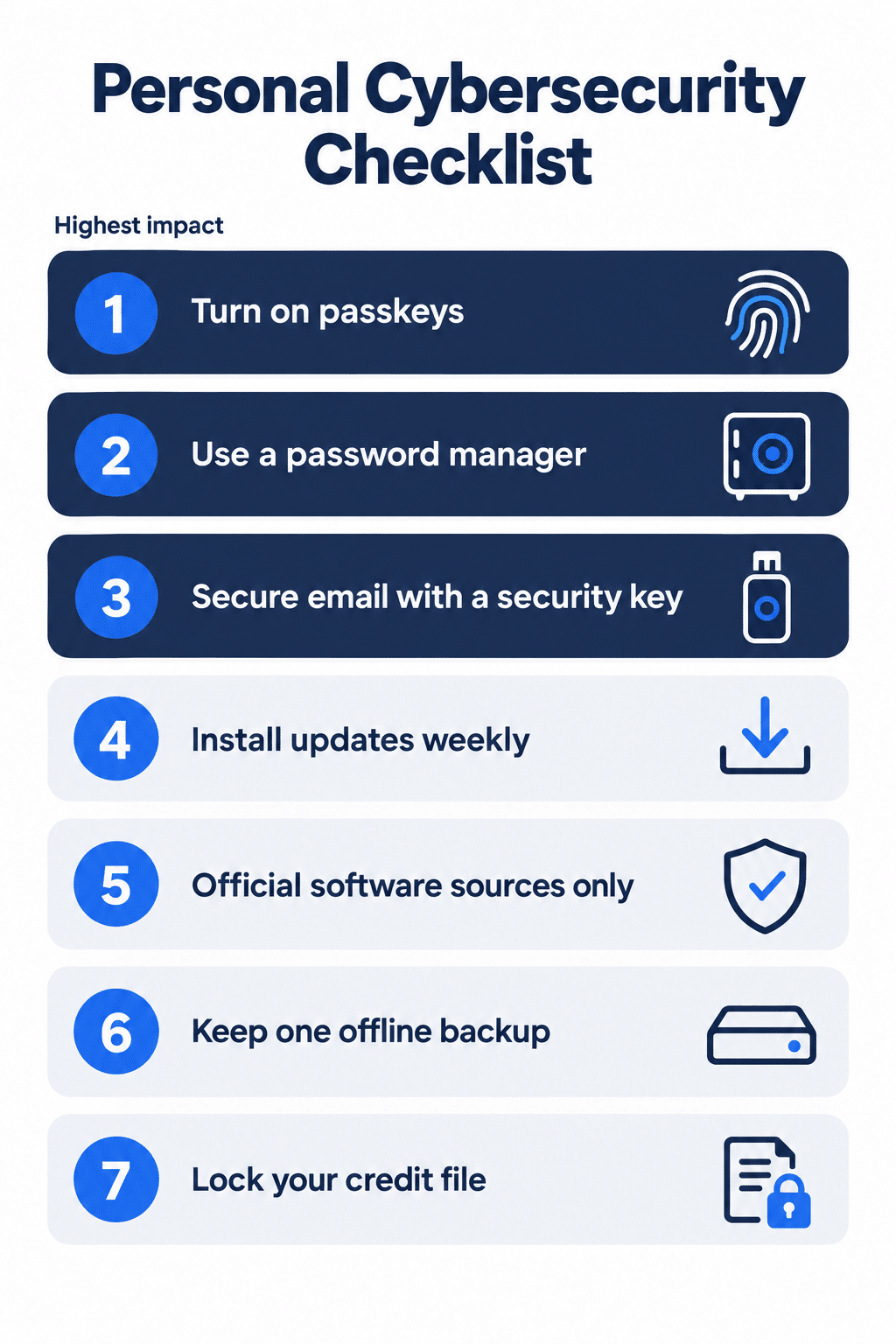
You do not need to be an IT specialist to close most of the gaps attackers rely on. Work through these in order. The first three matter more than everything after them combined.
- Turn on passkeys where they are offered. A passkey replaces your password with a cryptographic key stored on your device and unlocked by your face, fingerprint, or PIN. Because there is no password to type, there is nothing to phish. The FIDO Alliance reported roughly five billion passkeys in active use as of May 2026, with Google, Apple, and Microsoft accounts all supporting them. This is the highest-impact single change on the list.
- Use a password manager for everything else. Every account that still needs a password should have a different one, and no human can remember eighty unique strings. A manager generates them, stores them encrypted, and fills them only on the correct domain, which quietly blocks look-alike phishing sites. Our password manager usage guide walks through choosing one and migrating existing logins without losing access.
- Add a second factor to your email account first. Your email is the recovery address for everything else, which makes it the master key. Not all second factors are equal, and this is where most advice is out of date. SMS codes fall to SIM-swap attacks. Authenticator app codes are better, but modern phishing kits sit between you and the real site and relay your code in real time, then steal the session token after you have successfully logged in. Only domain-bound credentials resist that, which means a passkey or a physical security key using the FIDO2 and U2F standards. If you only harden one account this way, make it your email. We explain how the underlying protocol works in our guide to protecting sites from phishing with U2F.
- Install updates the week they ship. Most successful device compromises exploit vulnerabilities that were patched months earlier. Turn on automatic updates for your operating system, browser, and phone.
- Install software only from official sources. Cracked applications and search-ad installers are the primary delivery route for infostealer malware. The savings are never worth the saved-password harvest.
- Keep one offline backup. Ransomware and hardware failure both have the same answer. Follow the 3-2-1 rule: three copies, two different media types, one stored offline or off-site.
- Lock down your credit file where you can. In the United States, freezing your credit with all three bureaus is free, takes about fifteen minutes, and blocks the most damaging use of stolen identity data. The UK has similar protective registration through Cifas. In Brazil, you can register with Serasa and monitor for accounts opened in your name. Check what your country’s credit reference agencies offer, because the mechanism has a different name almost everywhere and most people never look.
What Antivirus and VPNs Actually Do
Both tools get oversold, so it is worth being precise about the job each one performs.
Antivirus catches known malware and increasingly flags malicious links and attachments in real time. On Windows, the built-in Microsoft Defender is genuinely competent and covers most consumers. Paid suites add convenience features and broader coverage across devices, but upgrading from Defender to a paid product is a smaller security improvement than turning on a passkey. Spend your effort in the right order.
A VPN encrypts your traffic between your device and the VPN server, and hides your IP address from the sites you visit. That is useful on untrusted networks such as hotel and airport Wi-Fi, and it prevents your internet provider from seeing which sites you connect to.
A VPN does not make you anonymous, and claims that it does are marketing. Your VPN provider can see the traffic your ISP no longer sees, which means you are transferring trust rather than eliminating it. Browser fingerprinting, cookies, and any account you are logged into still identify you. Malware already on your device is completely unaffected. Treat a VPN as a network privacy tool for specific situations, not as a security blanket, and choose a provider with an independently audited no-logs policy rather than the loudest advertising budget.
What to Do in the First Hour After a Compromise
Speed matters more than thoroughness here. Work in this order, because each step protects the ones after it.
Get to a device you trust. If the compromised account was accessed from your laptop, assume the laptop may be the problem. Use a phone, or another computer, that was not involved.
Change the password, then revoke sessions. Changing the password alone does not log an attacker out. Nearly every major service has a “sign out of all devices” or “active sessions” control in security settings. Use it. An attacker holding a live session token keeps their access until you kill it.
Check the recovery details next. Attackers change the recovery email and phone number early, precisely so they can lock you out once you notice. Do this in the same sitting as the password change, not later. If those details have already been altered and you cannot correct them, stop and go straight to the provider’s account recovery process rather than working through settings you no longer control.
Look at forwarding rules and connected apps. In email accounts specifically, a silent forwarding rule or a third-party app authorization survives a password change and quietly copies everything you receive. Both live in settings and both are easy to miss.
Work outward from email. Once email is secure, change passwords on anything that used the same password, and on anything that uses that email for recovery. Banking and payment accounts first.
Report it. In the United States, file with the FBI’s IC3 and with the FTC. In the UK, Action Fraud. In Brazil, a boletim de ocorrência plus notification to your bank. Reporting rarely recovers money, but it is often required before a bank will treat the loss as fraud rather than authorized.
Then, and only then, run a malware scan. People instinctively do this first. It is the least urgent step, because if credentials have already left your device, cleaning the device does not un-leak them.
If You Run a Website, the Stakes Change
We work on WordPress sites every day, and the compromise pattern is boringly consistent. It is almost never a clever exploit. It is a reused admin password, a plugin that stopped receiving updates two years ago, or a contributor account nobody remembered to remove after a project ended. The technical sophistication of the attacker is usually irrelevant, because the door was already open.
Everything above protects you as an individual. Running a site adds a second layer, because a compromised website damages the people who visit it, not just you.
An attacker who gets into a content management system can inject spam links that destroy your search rankings, redirect visitors to malicious pages, or quietly skim payment details from a checkout form. Recovery usually costs more in lost traffic and trust than in remediation fees.
The same principles scale up: unique credentials, multi-factor authentication on every admin account, prompt updates for the core platform along with every theme and plugin, and tested backups you have actually restored from at least once. For WordPress specifically, our cybersecurity guide to WordPress covers hardening steps at the hosting, file, and user-permission level.
One point worth making explicitly: your admin account is only as secure as your personal email account. If you skipped step three of the checklist above, none of the site-level hardening will matter.
Frequently Asked Questions About Personal Cybersecurity
Individuals hold the credentials that unlock everything else. Bank access, medical records, and work accounts all sit behind personal email and personal devices, and attackers target them precisely because individuals have no security team. In 2025, the FBI recorded over one million complaints in the United States alone, with Americans over 60 reporting roughly $7.7 billion in losses, up 37 percent year over year.
Turn on a passkey for your primary email account. Email is the recovery path for nearly every other service you use, so securing it protects everything downstream in one action. If your provider does not support passkeys yet, an authenticator app is a reasonable interim step, but treat it as interim rather than finished.
For most people using Windows, the built-in Microsoft Defender is sufficient and receives updates continuously. Paid products add cross-device coverage and convenience features, but the security gain over Defender is smaller than the gain from unique passwords and multi-factor authentication.
No. A VPN encrypts traffic between your device and the VPN server and hides your IP from the destination site. Your VPN provider can still see that traffic, browser fingerprinting still identifies you, and any account you log into still knows who you are. It is a privacy tool for untrusted networks, not an anonymity tool.
Check your address against Have I Been Pwned, a free service that indexes known leaked datasets and is widely used by security teams. Assume any password in use before a listed breach is compromised, change it, and confirm you have not reused it anywhere else. If your password manager offers a breach-monitoring feature, turn it on so this becomes automatic rather than something you remember to check.
Yes, for the specific problem of phishing. A password can be typed into a fake site, and both SMS codes and authenticator app codes can be relayed to an attacker in real time by a kit that sits between you and the real login page. A passkey is bound to the legitimate domain and cannot be handed over, because there is nothing to hand over.
Change the password from a different, known-clean device, revoke all active sessions in the account’s security settings, and check whether the recovery email or phone number was altered. Attackers change recovery details early to lock you out, so verify those before anything else.
The Takeaway
Cybersecurity is not a technical discipline you need to master. It is a small set of habits that shifts you out of the easiest-target category, which is where the overwhelming majority of successful attacks land.
Attackers optimize for volume and low effort. They are not defeating strong encryption, they are collecting reused passwords and waiting for someone to click. Passkeys, a password manager, multi-factor authentication on your email, and prompt updates will neutralize most of what the FBI’s 2025 report describes, and none of it takes more than an afternoon.
The reason not to overlook cybersecurity is not that the internet is dangerous. It is that the gap between doing nothing and doing the basics is enormous, and closing it is genuinely cheap.
Sources and Verification
Crime and loss figures come from the FBI Internet Crime Complaint Center’s 2025 Internet Crime Report, published April 2026. Passkey adoption figures come from the FIDO Alliance’s State of Passkeys 2026 report. Both are linked in full where they first appear above. All statistics last verified September 2026.