
When building a digital storefront, many business owners treat web design and search engine optimisation as two completely separate projects. They focus heavily on making the site look visually appealing first, planning to sprinkle in some keywords at a later date. However, the modern digital landscape does not operate this way. The competition within online retail has reached an all-time high, making technical excellence a mandatory requirement for survival. In this article, you’ll learn how UX design and site architecture shape e-commerce SEO.
Today, search algorithms are incredibly sophisticated and actively evaluate how real people interact with your website. If your user experience is frustrating or your site structure is confusing, your search rankings will inevitably suffer. Bridging the gap between technical design and search performance is absolutely essential for driving consistent online sales.
E-Commerce SEO in 2026: The Scale of What Is at Stake
Understanding why UX design and site architecture matter to search rankings starts with understanding what those rankings are actually worth in e-commerce.
Global e-commerce revenue surpassed $6.3 trillion in 2024 and is projected to reach $8 trillion by 2027. Within that market, organic search remains the highest-ROI acquisition channel for most online retailers, consistently outperforming paid search, social media, and email in terms of lifetime customer value. The businesses that build their sites correctly from a structural and UX standpoint capture a disproportionate share of that traffic.
The data on friction costs is equally stark. Research by the Baymard Institute, which has run the largest ongoing study of e-commerce usability in the world, consistently finds that approximately 70 percent of online shopping carts are abandoned before purchase. Poor UX accounts for a significant portion of that figure, with specific culprits including slow loading times, confusing checkout flows, and navigation structures that make products hard to find.
Google’s own research on mobile page speed, published through its Think with Google platform, found that a one-second delay in page load time can reduce conversions by up to 20 percent. A site that loads in five seconds has a 90 percent higher bounce rate than a site that loads in one second.
These are not abstract arguments about design quality. They are revenue equations. Every second shaved off load time, every navigation layer removed, every internal link placed correctly, and every category page properly structured has a measurable downstream effect on both search visibility and conversion rate. In e-commerce, those two outcomes compound: more organic traffic means more revenue, and higher conversion rates mean every visitor is worth more.
That compounding effect is exactly why UX and site architecture cannot be treated as afterthoughts in an e-commerce SEO strategy.
Why Structural Foundations Drive Search Visibility: UX Design and Site Architecture Shape E-Commerce SEO
Search engines deploy automated crawlers to understand, map, and categorise the content on your website. If your site architecture is a chaotic web of isolated product pages and dead ends, these crawlers will struggle to index your most valuable inventory.
A logical, hierarchical structure ensures that link equity flows smoothly from your homepage down to your overarching categories and individual product pages. Furthermore, maintaining a flat architecture where products are only a few clicks away from the homepage helps maximise your crawl budget.
This structural planning is particularly vital for regional businesses operating in highly competitive markets. Navigating complex site hierarchies and local search intent is challenging. That is exactly why many growing brands rely on ecommerce SEO services in Sydney to ensure their digital storefronts are properly mapped for both local consumers and search algorithms. A well-structured site not only helps search engines understand what you sell, but it also helps shoppers find exactly what they need in the fewest clicks possible.
URL Structure, Crawl Budget, and Site Depth: The Technical Architecture That Determines What Google Can See
The principle that search engine crawlers follow your site’s internal links to understand and index your content is well established. The practical consequences of getting that architecture wrong are less often discussed in concrete terms.
- URL structure sets the foundation. Well-structured e-commerce URLs follow a logical, readable hierarchy: /category/subcategory/product-name. This tells crawlers and human users exactly where they are in the store at a glance. Avoid auto-generated parameter URLs like /product?id=4872&color=blue&size=M for primary product pages. These are hard to crawl, impossible to read, and carry no keyword value. Set up clean, keyword-rich permalinks in your platform settings before you index a single product page, because changing URL structures on an established store requires careful 301 redirect management and temporarily disrupts rankings.
- Crawl depth determines whether your products get indexed. Search engine crawlers have a finite crawl budget allocated to each site, broadly reflecting the site’s authority and size. If your most valuable product pages sit seven or eight clicks from the homepage, crawlers may never reach them within their allocated budget, and those pages may not be indexed at all. The general guideline for e-commerce is to keep all important product and category pages within three to four clicks of the homepage. Large stores with thousands of SKUs should segment their XML sitemaps by category and submit them separately in Google Search Console so crawlers can prioritise strategically.
- Siloing strengthens topical authority. A content silo is a structured grouping of related pages under a shared category that signals to Google you have deep, coherent expertise on a specific topic area. For an outdoor equipment retailer, a well-built silo might group hiking boots, hiking socks, hiking backpacks, and hiking guides under a single parent category with consistent internal linking across all pages in the group. Search engines use these relationships to understand topical relevance, which directly influences which queries trigger your pages in search results.
- Pagination and filtered URLs require deliberate management. E-commerce stores with large product catalogs generate enormous numbers of paginated and filtered URLs: /shoes/women/ ?page=3, /shoes/ women/ ?color=red&size=8. Without a clear strategy, these pages dilute your crawl budget and create duplicate content signals. Use rel=”next” and rel=”prev” for pagination and implement canonical tags on filtered pages pointing to the base category URL. Your SEO platform or developer can automate this logic across thousands of pages with a single configuration.
The Hidden Financial Cost of Poor User Experience: UX Design & Site Architecture Shape E-Commerce SEO
User experience design is fundamentally about removing friction from the buyer journey. When shoppers land on a sluggish or difficult-to-navigate website, they quickly lose patience and leave. Search engines monitor these user signals closely to determine ranking positions. If visitors consistently click your link in the search results and immediately hit the back button, it tells algorithms that your store is unhelpful or irrelevant.
The financial impact of this friction is massive and immediate. Recent data published by Adobe reveals that the average ecommerce bounce rate is 43 percent, with slow page loading speeds acting as one of the primary culprits driving potential customers away.
A delay of just a few seconds can cost you thousands in lost revenue. By optimizing image sizes, cleaning up messy code, and upgrading your server response times, you simultaneously satisfy impatient shoppers and demanding search algorithms.
The UX Signals Google Actually Uses to Evaluate Your Store
One of the most persistent misconceptions about e-commerce SEO is that it is purely technical: keywords, links, and site speed. Google’s ranking algorithms have moved far beyond this. They incorporate a range of user behavior signals that collectively tell the algorithm whether real people find your store useful, trustworthy, and worth returning to.
- Dwell time and time on page. When a visitor arrives on your page from a search result and stays for several minutes before leaving, that is a positive signal. It suggests the page delivered what the searcher was looking for. Conversely, a visitor who arrives and leaves within seconds tells the algorithm the page failed to match their intent. For e-commerce, dwell time is influenced by page load speed, the quality and richness of product descriptions, the presence of reviews, and whether the navigation feels logical enough to encourage further browsing.
- Pogo-sticking. This term describes a specific pattern where a user clicks your result, immediately returns to the search results page, and then clicks a competitor’s result. It is a strong negative signal. Pages that generate high pogo-sticking rates often have a mismatch between their meta title and what the page actually delivers, or they fail to load fast enough to hold attention on mobile. Fixing the mismatch between search intent and page content is often more impactful than any technical SEO change.
- Click-through rate from search results. Google tests this extensively. If your page ranks in position four but consistently earns more clicks than the pages in positions two and three, that is a signal your result better satisfies that query. You can improve click-through rate without changing your ranking by using better meta titles (leading with the benefit rather than the keyword), more compelling meta descriptions, and rich results enabled by schema markup that make your listing visually distinctive on the results page.
- Pages per session. Visitors who navigate from one product page to a related category, then to a second product, and then to a review page are demonstrating exactly the kind of engaged behavior that signals a high-quality site. This metric is directly influenced by your internal linking, your related product suggestions, and the quality of your category and product page content. An e-commerce store where the average visitor views only 1.2 pages per session has a navigation and content problem as much as a traffic problem.
- Return visit rate. A visitor who bookmarks your store or returns within 30 days without a paid prompt is telling Google something that no amount of link building can fabricate: your store is worth coming back to. Loyalty signals of this kind feed into the overall quality assessment search engines apply to your domain over time.
Foundational Steps for Optimizing Your Storefront
Before you can start planning complex structural overhauls, you must ensure your basic technical foundations are sound. If your core platform setup is flawed, even the most beautiful visual interface will fail to convert traffic into revenue. For businesses using popular content management systems like WordPress. It is highly recommended to follow a comprehensive WooCommerce SEO improvement guide to optimise everything from product permalinks to custom taxonomies before launching.
Once your basic platform settings are correctly configured. You should turn your attention to the following design elements that directly influence both usability and search performance:
- Mobile Responsiveness: Mobile searches now dominate the digital retail space. Your store must feature touch-friendly buttons, easily readable text without zooming, and fast-loading mobile layouts.
- Faceted Navigation: Allowing users to filter products by size, colour, or price drastically improves the shopping experience. However, these dynamic filters must be coded correctly so they do not create duplicate content issues for search crawlers.
- Breadcrumb Trails: Breadcrumbs help users clearly understand their current location within your store hierarchy. They also provide search engines with distinct internal linking pathways to better understand the relationship between your product categories.
- Clear Calls to Action: Buttons like “Add to Cart” or “Proceed to Checkout” should be visually distinct. Strategically placed to minimise the cognitive effort required to complete a purchase.
Internal Linking Architecture: The Silent SEO Multiplier Most Stores Ignore
If you ask most e-commerce site owners to describe their internal linking strategy, they will reference their main navigation menu and their related products widget. That is not a strategy. It is a default setting.
Internal linking is the mechanism by which link equity, the accumulated authority your domain has earned through backlinks and age, flows from high-authority pages like your homepage and most-linked category pages down to the product pages that actually generate revenue. Getting this flow right is one of the highest-return SEO activities available to an established store, and it requires zero additional content creation or link outreach.
- The hub-and-spoke model for e-commerce. Think of your primary category pages as hubs: broad, keyword-rich pages that target high-volume queries like “men’s running shoes” or “organic skincare products.” Each hub page links to the relevant product pages (spokes) within that category, and each spoke links back to the hub. This creates a logical, crawlable structure where category pages capture broad search traffic and product pages capture specific purchase-intent queries, with authority flowing bidirectionally between them.
- Editorial content as a link engine. A buying guide titled “How to Choose the Right Trail Running Shoe” can rank independently for informational queries, capture readers early in the research phase, and link directly to three or four specific product pages within your store. That single piece of content earns backlinks, educates the buyer, and passes authority to your product pages simultaneously. This is why the most effective e-commerce SEO strategies include a content component: not for content marketing’s sake, but because editorial pages are the most natural context for high-value internal links.
- Anchor text diversity matters. When you link to a product page internally, vary your anchor text across different instances. Use the exact product name in some links, a descriptive phrase in others (“our top-rated trail shoe for beginners”), and a category anchor in others (“browse our trail running collection”). A pattern of only exact-match anchor text across hundreds of internal links is an unnatural signal. Varied, contextually appropriate anchors look like a real editorial site, which is precisely what both Google and human readers expect.
- Orphan pages are a waste of your authority. An orphan page is one with no internal links pointing to it. In a large e-commerce store, new product pages are frequently added without being linked from anywhere except the auto-generated sitemap. These pages receive no link equity, are deprioritised in crawl queues, and often go unindexed for months. Audit your store quarterly for orphaned pages and link them from at least two contextually relevant locations: a category page and a related product or guide page.
Category Page Optimization: The Most Underused SEO Opportunity in E-Commerce
In most online stores, product pages receive the most SEO attention. Product descriptions are written carefully, image alt text is considered, and meta titles are optimised. Category pages, meanwhile, are often left with default headings, empty description fields, and no editorial content whatsoever.
This is a significant missed opportunity. Category pages rank for the broadest, highest-volume commercial keywords in any store’s target list. A well-optimised category page for “women’s waterproof hiking boots” can attract thousands of visitors per month who are in active buying mode. A poorly optimised one, with a generic H1 and no unique content, competes for that traffic at a structural disadvantage against competitors who have invested in these pages.
Write category descriptions that genuinely add value. Many stores add a one-sentence description above their product grid and call it done. The more effective approach is a 150 to 250 word category introduction that addresses what this product category is, who it is for, what makes a good product in this category, and what the store offers in terms of selection or expertise. This content gives Google something substantive to index and gives new visitors a reason to trust they are in the right place.
Position editorial content intelligently. A common objection to adding text to category pages is that it pushes the product grid further down the page, wasting the above-the-fold real estate that drives purchasing decisions. The solution is to place a brief introduction above the grid (two to three sentences) and move the fuller descriptive content below the grid. Both human visitors and search crawlers read below the fold. Product shoppers see the products first. This structure satisfies both audiences.
Optimise H1 tags and meta data for commercial intent. The H1 of your category page should match the primary commercial keyword exactly or very closely: “Women’s Waterproof Hiking Boots” rather than “Shop Our Hiking Boot Collection.” The meta title should lead with the keyword and add a value modifier: “Women’s Waterproof Hiking Boots | Free Delivery | [Store Name].” Meta descriptions should summarise the category and include a call to action alongside the product count or a key differentiator.
Canonical strategy for faceted navigation. When a visitor filters your category page by size, color, or price, your store generates new URLs for each filter combination. Without canonical tags, each of these URLs is a potential duplicate content signal. The standard approach is to set canonical tags on all filtered category URLs pointing back to the base (unfiltered) category URL. This consolidates the ranking signals from every filtered version into the one URL you want Google to rank. Your development team or SEO plugin can automate this across your entire catalog.
Schema Markup for E-Commerce: Free Visibility You Are Probably Leaving in Google’s Results Page
Rich results are the enhanced listings you see in Google Search with star ratings, prices, stock availability, and breadcrumb trails displayed directly in the results page before a user even visits your site. They are generated by structured data (schema markup) embedded in your page’s HTML. For e-commerce sites, they represent a meaningful increase in click-through rate for rankings you already have, at no additional advertising cost.
Product schema. The most important schema type for any e-commerce store is Product schema. It tells Google the name, description, image, brand, SKU, and current price of each product. When implemented correctly, Google can display price and availability information directly in search results for product queries. This visual distinction makes your listing stand out from competitors who have not implemented schema, even if they rank in a higher position.
AggregateRating schema. Star ratings in search results are one of the most reliable click-through rate boosters available. AggregateRating schema tells Google the average review score and total review count for a product, enabling the star display in results. Studies from Schema.org and various SEO publishers have consistently found that rich results featuring star ratings earn click-through rates 15 to 30 percent higher than the same position without them. For a high-ranking category with significant search volume, that difference in click-through rate compounds into substantial traffic.
BreadcrumbList schema. Breadcrumb schema tells Google the exact path from your homepage to the current page in a format Google can display in the result snippet. Instead of showing a long, complex URL, Google shows a clean path like “Home > Women’s Shoes > Hiking Boots.” This improves the visual appeal of your result and reinforces the logical hierarchy of your site architecture in Google’s understanding of your store.
How to implement schema in WooCommerce. WooCommerce generates basic Product schema automatically, but it is often incomplete, particularly for AggregateRating data. The Rank Math and Yoast SEO Premium plugins both extend WooCommerce schema implementation significantly. For stores requiring granular control over schema output, the Schema Pro plugin provides field-by-field configuration for every schema type. After implementation, test your markup using Google’s Rich Results Test (search.google.com/test/rich-results) to confirm it validates correctly before expecting rich results to appear in search.
Frequently Asked Questions About UX Design Shape and E-Commerce SEO
Site architecture refers to the way pages in an online store are organised, linked to each other, and structured for both human navigation and search engine crawling. In e-commerce, this includes the hierarchy of category and subcategory pages, the URL structure of product pages, the depth (number of clicks) required to reach any page from the homepage, and the internal linking patterns that determine how authority flows throughout the site. Good architecture makes every important page easy for both shoppers and search crawlers to reach quickly and efficiently.
Google’s ranking algorithms incorporate user behavior signals alongside traditional technical signals like backlinks and page speed. When visitors arrive on a page and leave immediately (pogo-sticking), when they spend only seconds before returning to search results, or when they abandon a shopping session due to confusing navigation, these behavioral patterns are detectable signals that the page did not satisfy the user’s intent. Over time, pages that consistently generate poor behavioral signals lose ranking ground to pages that keep visitors engaged. UX design decisions including load speed, navigation clarity, mobile layout, and content quality directly shape these measurable signals.
The most SEO-friendly URL structure for e-commerce follows a clean, readable hierarchy: domain.com/category/subcategory/product-name. Each segment of the URL should use hyphens (not underscores or spaces) between words and should avoid unnecessary parameters, session IDs, or auto-generated numeric identifiers in the primary URL for important pages. URLs should be lowercase, concise, and descriptive enough that a person reading the URL alone can understand what the page is about. Set this structure up correctly before launch, as restructuring an established store’s URLs requires careful 301 redirect management to avoid temporary ranking losses.
Faceted navigation (filtering products by size, color, price, rating, and similar attributes) creates large numbers of dynamically generated URLs that can cause duplicate content issues and waste crawl budget if not managed deliberately. The standard approach is to implement canonical tags on all filtered URL variations, pointing back to the base category URL as the authoritative version. For filters that create genuinely unique, high-value pages (such as a “waterproof hiking boots under $100” filter that maps to a real search query), consider allowing those specific filtered pages to be indexed rather than canonicalized. Your SEO plugin or development team can configure this logic across your catalog systematically.
The widely referenced guideline in technical SEO is that no important page on an e-commerce site should be more than three clicks away from the homepage. This is sometimes called the three-click rule. In practice, this means: homepage to category (one click), category to subcategory or product listing (two clicks), and product detail page (three clicks). For very large stores with deep category trees, four clicks is acceptable for long-tail product variants, but the principle of keeping your most valuable, highest-margin products closest to the homepage in click depth remains sound. Pages buried six or more clicks deep are frequently under-indexed and under-ranked relative to their actual quality.
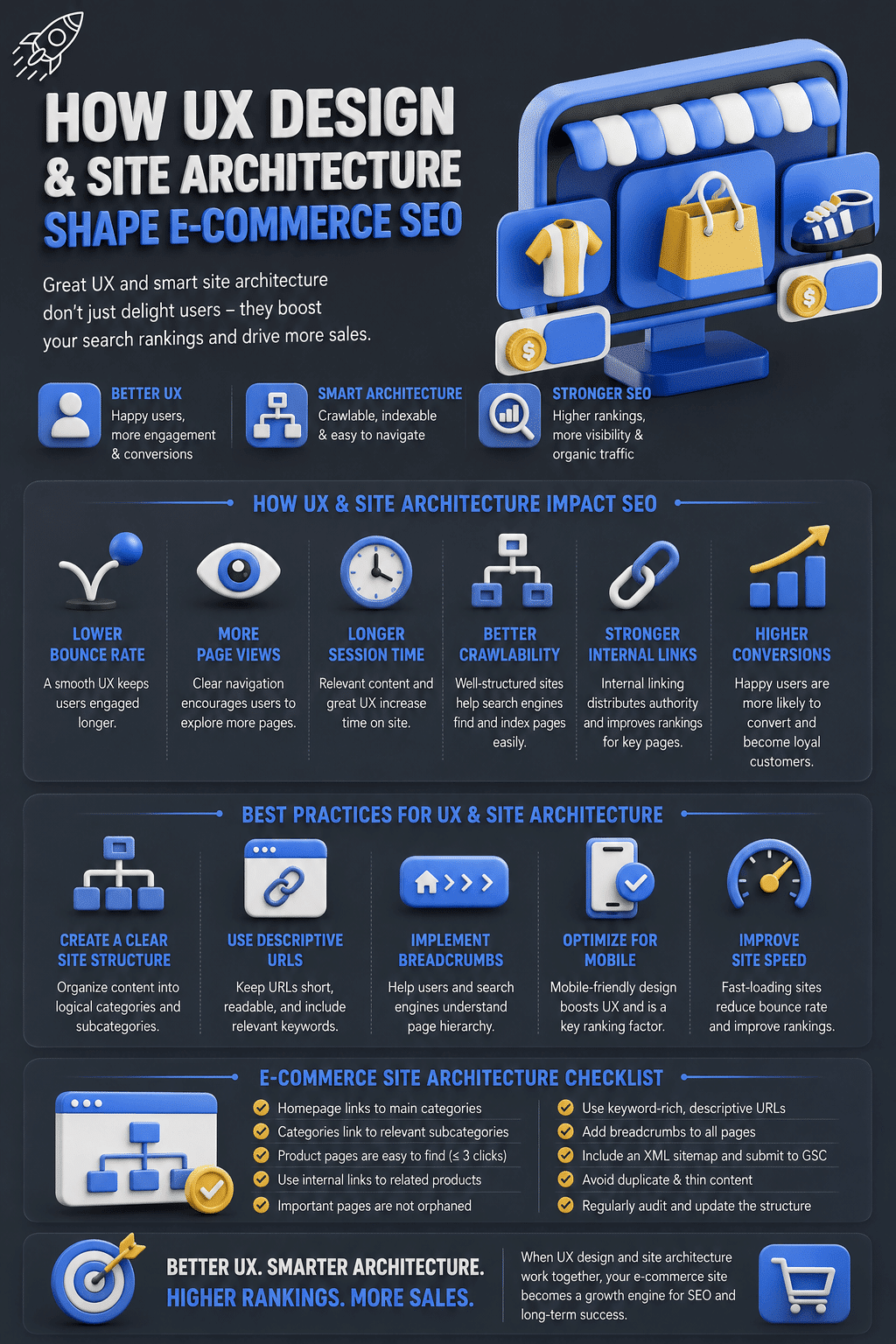
Infographic
Design and SEO Are Not Two Projects. They Are One Decision.
The framing that separates web design from search engine optimisation is a legacy of how the industry was originally divided into specialisms. It does not reflect how either discipline actually works in practice.
Every decision made during an e-commerce site build, from the URL structure chosen on day one to the font size on a category page description, carries both a UX consequence and an SEO consequence. A navigation menu that is logical for a shopper is also navigable for a crawler. A category page with genuine editorial content serves both the first-time visitor and the indexing algorithm. A product page with schema markup earns trust from the buyer and earns rich results from Google.
The stores that treat these as a single unified discipline from the earliest planning stages consistently outperform those that design first and optimise later. Architecture decisions made after launch are expensive to reverse. UX decisions made without SEO input create technical debt that slows growth for years.
Start with structure. Build content that genuinely helps the buyer. Connect pages with intentional internal links. Measure behavioral signals and respond to what they tell you. These are not separate workflows. They are the same workflow, run once, run well.
For practical next steps on the technical platform side, the WooCommerce SEO improvement guide on this site covers permalink configuration, taxonomy setup, and product page optimisation in detail. If your site’s mobile experience needs attention alongside its architecture, the guide to mobile-first WordPress design covers the performance and UX decisions that affect both rankings and conversion rates on small screens.