Most web design projects that go sideways don’t fail because of the design. They fail because the scope was fuzzy, the deposit never cleared, or nobody could find the signed version of the agreement when the client asked for a fourth round of revisions. A signed contract won’t fix a bad client relationship, but it gives you something firm to point to when the conversation gets uncomfortable.
You don’t need to print, sign, scan, and email PDFs anymore. Electronic signatures are legally recognized in the US, the UK, the EU, and most other markets your clients are likely to be in. The catch is that “legally recognized” depends on how you collect the signature, and a lot of freelancers and small studios do it in a way that would be hard to defend if a dispute ever reached a lawyer.
This guide covers two things: what actually makes an e-signature hold up, and how to build signing into your project workflow so contracts stop being the thing that delays kickoff.
Quick note: this is practical guidance, not legal advice. If you work in a regulated industry or handle unusual contract types, run your templates past a lawyer in your jurisdiction.
What makes an electronic signature legally valid
Under the US ESIGN Act, an electronic signature is any electronic sound, symbol, or process that a person adopts with the intent to sign a record. That definition is broader than most people expect. A typed name, a signature drawn on a touchscreen, or a click on an “I agree” button can all qualify.
What separates a defensible signature from a weak one isn’t the squiggle itself, it’s the evidence around it. Across most legal frameworks, courts look for the same handful of things.
1. Intent to sign
The signer has to clearly mean to sign. A dedicated signing step with an obvious label like “Sign” or “Adopt and sign” does this well. Burying acceptance in a footer link, or assuming a reply email that says “looks good” counts as agreement, does not.
2. Consent to do business electronically
In the US, the signer needs to agree to use electronic records and signatures instead of paper. Most e-signature tools show a short consent disclosure before signing for exactly this reason. For B2B contracts the bar is low, but it’s still worth having on record.
3. Signer identity
You need a reasonable way to show that the person who signed is the person you sent the contract to. For a typical web design agreement, sending a unique signing link to the client’s email address is usually enough. For higher-value work, adding a one-time code sent by email or SMS strengthens the record considerably.
4. A document that can’t be quietly changed
The signature has to be tied to the exact document that was signed. If someone could edit the PDF after signing without leaving a trace, your contract loses much of its weight. Good tools lock the document and apply a tamper-evident seal once every party has signed.
5. An audit trail you can actually retrieve
This is the piece most DIY setups skip. An audit trail logs who opened the document, when, from which IP address, and when each party signed. If a client ever claims they never agreed to the payment terms, the audit certificate is what you hand over. Keep it with the signed PDF, not buried in an inbox you’ll never search again.
How the main legal frameworks treat e-signatures
You don’t need to memorize the statutes, but it helps to know which ones apply to your clients.
United States. The federal ESIGN Act (2000) and the Uniform Electronic Transactions Act (UETA), adopted by 49 states plus Washington DC, give electronic signatures the same legal effect as handwritten ones for most commercial contracts. New York, the one holdout, has its own equivalent law. A service agreement for a website build falls well inside both.
European Union. The eIDAS Regulation defines three levels: simple electronic signatures (SES), advanced electronic signatures (AdES), and qualified electronic signatures (QES). Article 25 states that an electronic signature can’t be denied legal effect just because it’s electronic. For ordinary agency contracts, SES or AdES is the norm. QES requires a certified identity check and a qualified signing device, and it’s mostly reserved for cases where national law specifically demands it.
United Kingdom. After Brexit, the UK kept its own version of eIDAS alongside the Electronic Communications Act 2000. The Law Commission confirmed in 2019 that electronic signatures can validly execute most documents under English law.
If you work with international clients, the rules shift a little from country to country, especially around which documents need a higher signature level. A country-by-country breakdown of e-signature laws is a useful reference to check before you send a contract into a market you haven’t worked in before.
Documents that usually still need wet ink
A few document types are excluded or restricted in many jurisdictions: wills, some real estate deeds, family law matters, and certain court filings. Web design and development agreements, NDAs, statements of work, and change orders aren’t in that group, so for day-to-day agency paperwork you’re almost always covered.
Where signatures fit in a typical agency project
Most agencies think of “the contract” as a single moment. In practice, a project produces several documents that each need a signature, and treating them all the same way is where things get messy.
| Project stage | Document | Who signs |
| Before the pitch | Mutual NDA (optional) | Agency and client |
| Sale | Master services agreement (MSA) | Client, then agency |
| Kickoff | Statement of work with scope, timeline, and payment schedule | Client, then agency |
| Mid-project | Change order for added scope | Client |
| Delivery | Final sign-off and asset licensing | Client |
| Ongoing | Retainer or maintenance agreement | Client, then agency |
Keeping the master agreement seperate from the SOW is worth doing if you have repeat clients. The MSA holds the legal terms, like IP ownership, liability, and termination, and gets signed once. Each new project then only needs a short SOW, which is much easier for a client to approve without forwarding it to their legal team.
Building a signing workflow that doesn’t slow you down
Turn your contracts into templates
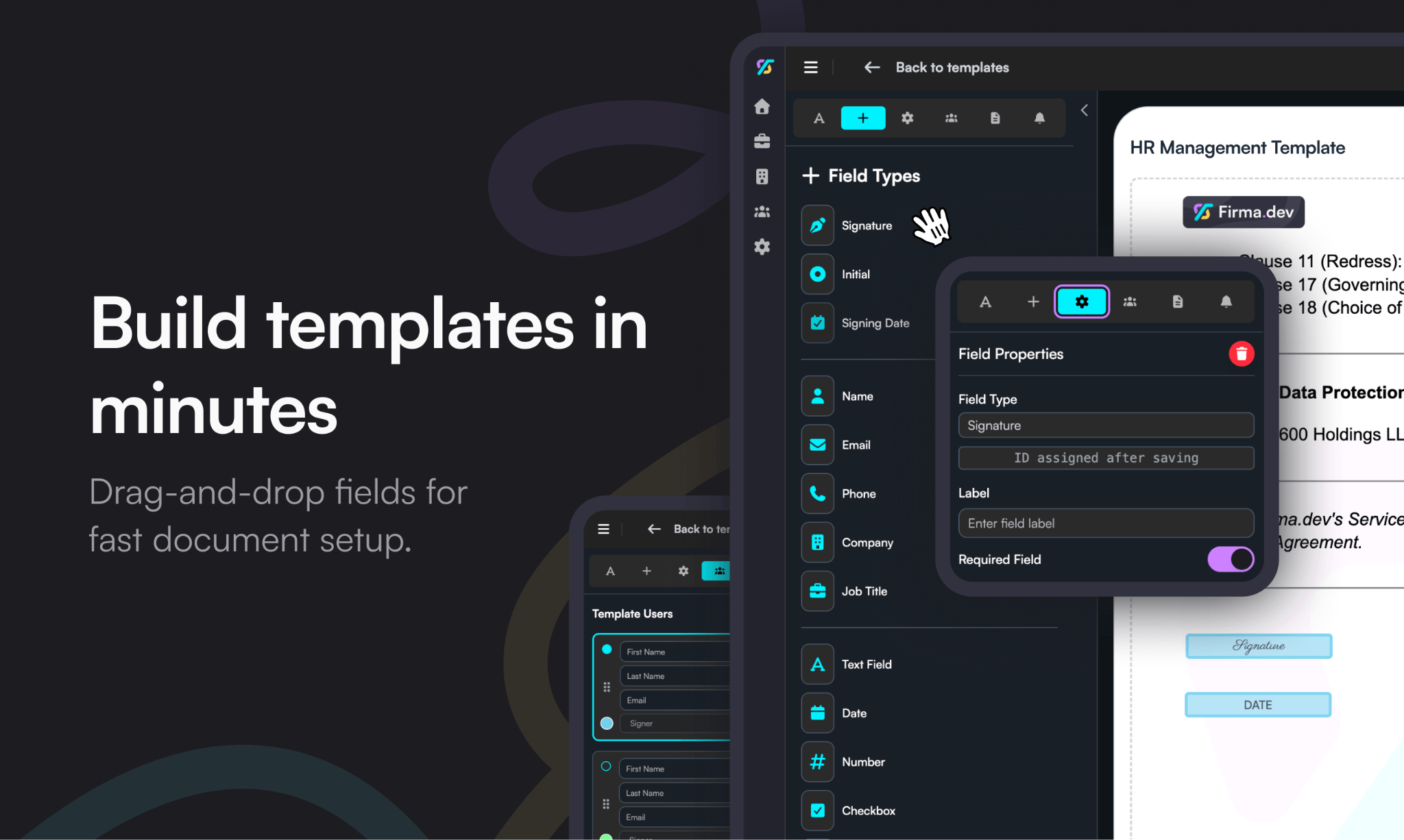
Stop editing a Word doc for every new client. Build one template per document type with fields for client name, company, project fee, deposit amount, and start date. Most e-signature tools let you place signature, date, and initial fields once and reuse them indefinitely. A template also means nobody on your team accidentally sends an old version with last year’s rates.
Set the signing order deliberately
For MSAs and SOWs, have the client sign first and the agency countersign. That way you never send out a contract you’ve already signed, which a client could sit on or mark up before returning. For change orders, the client’s signature alone is often enough, since it amends a contract you’ve both already signed.
Connect the signature to the deposit
The most common delay in agency projects is the gap between “yes, let’s do it” and an actual payment landing. Send the deposit invoice automatically as soon as the SOW is fully signed. Many e-signature platforms offer webhooks or integrations with tools like Zapier and Make, so a “document completed” event can create an invoice in Stripe, QuickBooks, or whatever you already use. Kickoff gets scheduled only once both the signature and the deposit are in.
Let reminders do the chasing
Automated reminders after two and five days handle most of the follow-up for you, and they feel less awkward than a personal “just checking in” email. If a contract still sits unsigned after a week, that usually tells you something about the client rather than the tool.
Make the signing experience match your brand
Clients judge the professionalism of your studio by every touchpoint, and the contract is one of the first they see. A signing page with your logo and colors, sent from a recognizable address, looks like part of a considered process. A generic notification from an unfamiliar sender looks like spam, and sometimes ends up in the spam folder.
File everything in one place
When the last signature lands, store the signed PDF and its audit certificate in the client’s project folder automatically. Six months later, when someone asks whether hosting was included in the original quote, you want that answer in under a minute.
Choosing a tool: what matters for agencies
Agencies have a slightly different set of needs from an in-house legal team, and a few factors matter more than any feature checklist suggests.
- Pricing model. Per-seat plans add up quickly when several people on your team send contracts. Usage-based pricing, where you pay per document sent, tends to fit agencies better because volume rises and falls with your pipeline. Firma.dev, for example, charges €0.049 (about 5¢ USD) per envelope with no monthly minimum or per-seat fees, so a studio sending 20 contracts in a busy month pays roughly €1.
- Client separation. If you handle dozens of unrelated clients, you want templates and signed documents organized cleanly per client so nothing goes to the wrong inbox.
- Audit trail quality. Check that the tool produces a downloadable audit certificate with timestamps and IP addresses, not just a “signed” status label.
- Integrations or an API. If you already run projects through a CRM or project management tool, triggering contracts from there saves the most time.
- International coverage. If your clients sit in more than one country, confirm the tool supports the signature levels those countries expect.
A practical example
Picture a five-person studio that closes around eight new projects a month. Before changing anything, the owner edited a contract in Google Docs, exported it to PDF, emailed it, waited, chased, recieved a scanned signature back, and then created the deposit invoice by hand. The average time from a verbal yes to a paid deposit was about nine days.
After switching to templated contracts with client-first signing, automatic reminders, and a webhook that creates the invoice on completion, that gap dropped to two or three days. The contract terms stayed exactly the same. What changed is that the manual handoffs between each step disappeared, and with them most of the waiting.
Wrapping up
Getting contracts signed online is mostly a process problem rather than a legal one. Electronic signatures are valid for the kind of agreements web designers and agencies use every day, as long as you can show intent, identity, an unaltered document, and a clear audit trail. Once that foundation is in place, the real gains come from templates, a sensible signing order, and connecting each signature to whatever comes next in the project, whether that’s an invoice, a kickoff call, or a folder in your shared drive.
Start with your most-used document, which for most studios is the SOW. Turn it into a template and run your next three clients through it, and you’ll spot the gaps in your process far faster than you would by trying to design the perfect system up front.