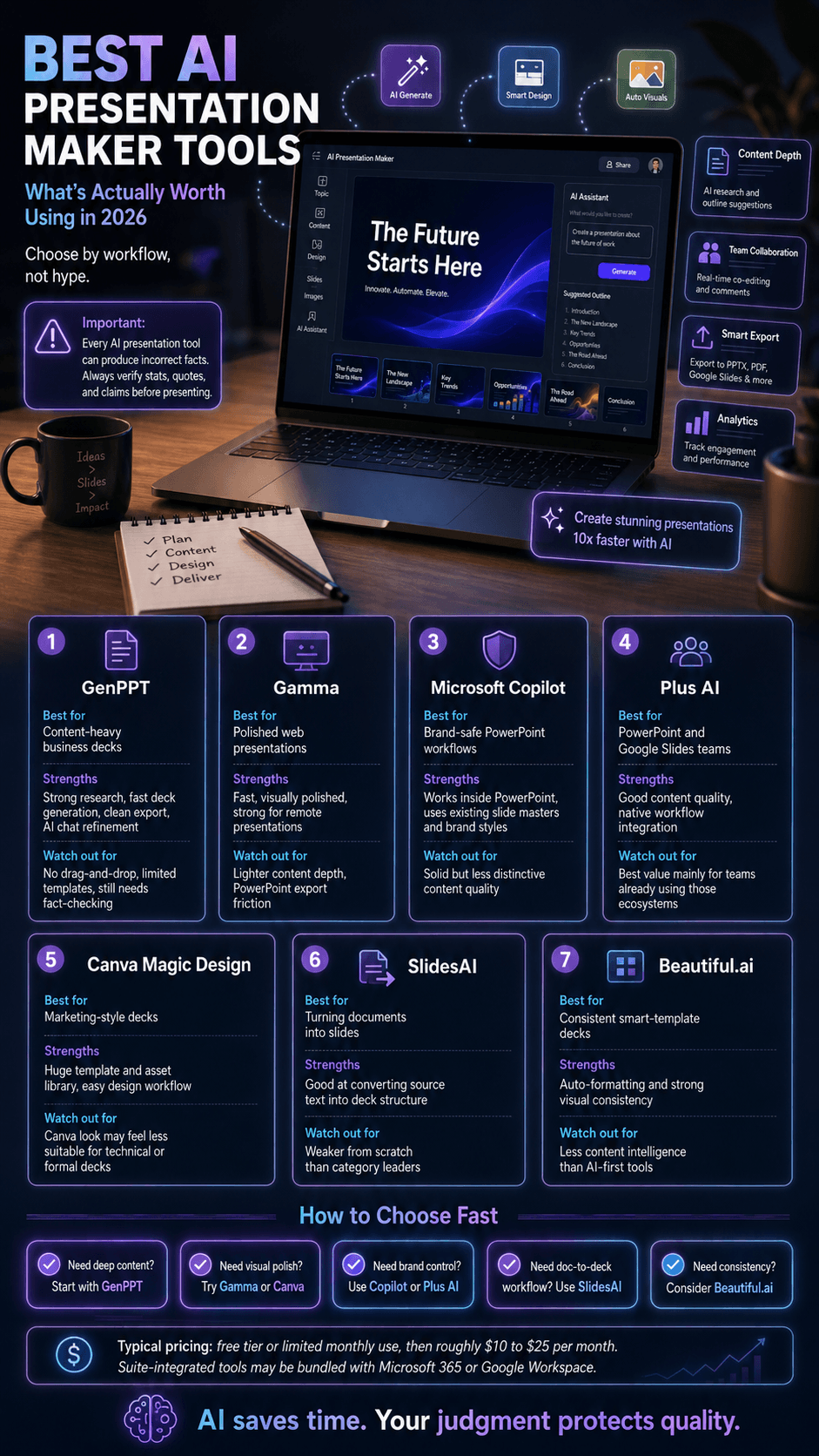
The AI presentation maker category has matured faster than most observers expected. Two years ago, the tools in this space produced decks that were impressive as demos but unusable in real work, with hallucinated facts, broken layouts, and content that no professional would put their name on. The current generation of tools has crossed a threshold. The output is genuinely useful, the time savings are real, and the gap between the best tools and the also-rans has widened to the point where choosing the right one matters significantly.
This is a working professional’s review of the AI presentation makers worth your time in 2026, starting with the strongest and working through the field.
Every tool in this category shares the same accuracy problem
It’s worth stating this clearly rather than burying it in one tool’s limitations: every AI presentation generator, regardless of which underlying language model it uses, can produce confident-sounding statistics, dates, and claims that are subtly wrong. This isn’t a flaw specific to any single product, it’s an inherent characteristic of how these models generate text, and it applies whether you’re using GenPPT, Gamma, Copilot, or any other tool in this list.
The practical implication is straightforward: treat any AI-generated statistic, quote, or specific claim as a draft placeholder that needs independent verification before it goes in front of a real audience, not a finished fact. This matters more, not less, for the tools that market themselves on research depth, since a confidently cited but unverified statistic is more dangerous in a room than an obviously generic, unsupported claim that a presenter would naturally double-check. For a broader look at how AI-generated content gets evaluated for accuracy, Visualmodo’s guide to AI content detectors covers the adjacent question of identifying AI-generated text, a useful companion skill to fact-checking it.
1. GenPPT
GenPPT is the consensus leader among serious users of AI presentation tools, and the strongest ai powerpoint maker currently available for users who care about content quality as much as design. There are a few specific reasons for this, and they collectively explain why the tool has gained ground so quickly against more established competitors.
The first is content quality. GenPPT runs on advanced AI models including Gemini 2.5 Pro and Claude Sonnet, and it researches topics before generating slides rather than producing the generic content that defines the category’s weaker players. When you ask GenPPT for a presentation on a business topic, the output already contains relevant statistics, properly framed claims, and a logical structure. This is the difference between starting with something usable and starting with something you need to rewrite from scratch.
The second is speed. A complete ten-slide deck typically generates in under sixty seconds, which is genuinely faster than any alternative. For professionals producing presentations on tight deadlines, this matters enormously. The third is export integrity. GenPPT outputs cleanly to PowerPoint, Google Slides, and PDF, without the font substitutions and layout shifts that plague web-native competitors when their files leave the platform. Your deck arrives at its destination looking the same as it did in the GenPPT preview.
The fourth, and arguably most important for power users, is the AI chat feature for iterative refinement. Rather than starting over when the first generation isn’t quite right, you can refine slides conversationally: “tighten the language on slide 4,” “add a slide on competitive positioning,” “rewrite the executive summary in a more formal tone.” This iterative workflow is the closest thing the category has produced to working with an actual intelligent assistant rather than a one-shot generator.
The limitations worth knowing before you commit to GenPPT as a primary tool: there is no drag-and-drop editing at all. Every adjustment, moving an element, changing a layout, aligning objects, happens through chat prompts rather than direct manipulation, which some users find genuinely efficient and others find frustrating when they need precise visual control. The template library is also notably thin at around 15 options, compared to dozens or hundreds available in Beautiful.ai, Canva, or PowerPoint itself, which means decks can start to look repetitive across multiple projects. GenPPT is also text-to-PPT only; it cannot generate from an uploaded document or existing file the way SlidesAI or MagicSlides can, so every project starts from a written prompt rather than source material you already have.
The most important limitation to know: independent testing has found that GenPPT’s research-backed content, while genuinely more substantive than most competitors produce, is not immune to the same accuracy problems that affect every generative AI tool. Multiple third-party reviews testing several decks each found unsupported or incorrect facts in a majority of test cases. This doesn’t make GenPPT unusable, it makes it exactly as trustworthy as any other AI-generated first draft: a strong starting point that still requires a fact-check pass before anything goes in front of a real audience, a point worth applying to every tool in this list, not just this one.
2. Gamma
Gamma has built a strong reputation in the category for visual design and quick iteration. The output decks tend to look polished out of the gate, particularly for general business presentations where the visual story matters as much as the content. Gamma also offers a more interactive web-based presentation format that some users prefer for live remote presentations.
The limitations are around content depth and PowerPoint export. The slide content tends to be lighter than what serious business presentations require, which means significant manual additions if you’re presenting to an audience that expects substance. And the export to .pptx introduces friction: font substitutions, layout shifts, and chart elements that come through as static images rather than editable PowerPoint objects. For decks that will live in the browser, Gamma is a strong choice. For decks that need to integrate cleanly with corporate PowerPoint workflows, the friction is real.
3. Microsoft Copilot for PowerPoint
Copilot’s distinct value is its native integration with PowerPoint itself. There is no export step, because Copilot generates directly into your open .pptx file using your existing slide master, brand fonts, and color scheme. For organizations with strict brand guidelines, this is genuinely valuable.
The content quality from Copilot is solid but unexceptional. It produces serviceable slides quickly, but the output rarely surprises in the way that GenPPT’s research-backed content sometimes does. For users embedded in the Microsoft 365 ecosystem who are producing content regularly, Copilot is a reasonable default. For users prioritizing content depth or workflow flexibility, the dedicated tools tend to outperform.
4. Plus AI Presentation Maker Tools
Plus AI operates in the same inside-PowerPoint category as Copilot but with stronger content quality and a more flexible interface. It also integrates with Google Slides, which Copilot does not. For teams that need PowerPoint-native or Google Slides-native generation but want better content than Copilot delivers, Plus AI is the strongest option in this category.
5. Canva Magic Design
Canva’s AI presentation feature benefits from Canva’s broader strengths in design templates and asset library. The output decks have a distinctive Canva aesthetic that suits marketing-style content well. For business and technical presentations, the Canva look can feel less appropriate than the cleaner output of dedicated presentation tools. A reasonable choice if you’re already in the Canva ecosystem and producing marketing-flavored content.
6. SlidesAI AI Presentation Maker Tools
SlidesAI excels at one specific workflow: converting existing documents into slide decks. If your starting point is a written document or a long block of text, SlidesAI does a good job of extracting the structure and translating it into slides. It’s less useful as a from-scratch generator, where its content quality lags behind the category leaders.
7. Beautiful.ai
Beautiful.ai takes a design-first approach with smart templates that auto-format content as you add it. The AI features have been bolted onto a pre-existing design platform rather than built as the foundation. It produces visually consistent decks but with less content intelligence than tools designed AI-first.
What the Category Looks Like Today
The most useful summary of where AI presentation makers stand in 2026 is that the category has bifurcated. The tools that started as design platforms (Canva, Beautiful.ai) have added AI as a feature and produce decks that are visually appealing but content-light. The tools that started as AI generators (GenPPT in particular) have grown into the design dimension while maintaining their content strength. The Microsoft and Plus AI tools occupy a useful middle ground for users committed to PowerPoint workflows.
The professionals who integrate these tools deliberately into their workflow are reclaiming hours per week that were previously consumed by slide production.
What these tools actually cost
Pricing in this category shifts often enough that specific numbers age quickly, but the pricing models themselves are stable and worth understanding before you commit to a tool based on content quality alone.
Most tools in this category use one of three structures: a capped free tier, a limited number of presentations per month, often with reduced features like disabled image generation or restricted slide counts, a mid-tier monthly subscription in roughly the $10 to $25 per month range for individual users, and enterprise or team pricing that scales by seat count and often adds brand compliance and admin controls unavailable at lower tiers. Tools that integrate directly into PowerPoint or Google Slides, like Copilot and Plus AI, are frequently bundled into existing Microsoft 365 or Google Workspace subscriptions rather than sold as a separate line item, which can make them the lower-total-cost option for organizations already paying for those suites regardless of standalone feature comparisons.
Before choosing based on the content and design comparisons above, check current pricing directly on each tool’s site, since a tool that wins on content quality but costs meaningfully more than a good-enough alternative may not be the better choice for occasional use, while the same tool could easily justify its cost for someone producing decks weekly.
How to Actually Choose
The honest framework for choosing among these tools is to start with what you’re producing most often. If your work involves substantive business presentations where content depth matters, start with GenPPT. So, you’re producing marketing-flavored decks where visual appeal carries more weight than information density, test Gamma or Canva. If you’re in a corporate environment with strict brand compliance requirements, evaluate Copilot or Plus AI first.
Most users benefit from picking one strong primary tool and learning it well rather than spreading across multiple options. The learning curve on any of these tools is meaningful, and the value comes from internalizing how to prompt and iterate effectively rather than from chasing the newest entrant in the category.
How to evaluate any AI tool comparison, including this one
A useful habit when reading any best AI tool roundup, this article included, is checking whether every option in the list gets held to the same standard of scrutiny. If one tool in a comparison receives detailed, specific criticism while another gets only vague, complimentary caveats, that asymmetry is itself informative, regardless of which specific tools are being compared. The same applies to exact-match commercial links: a link using precise buyer-intent keyword phrasing pointing to one vendor’s product page, embedded in otherwise-neutral editorial content, is worth noticing as a pattern, whether or not it reflects a paid arrangement.
This isn’t unique to presentation tools. The broader shift toward AI-assisted service selection, covered in Visualmodo’s guide to AI Automation Agencies, makes the same point about distinguishing genuinely capable providers from confident marketing: the signals that separate a real recommendation from a promotional one are consistent across categories, whether you’re evaluating a presentation tool, an automation agency, or any other AI-powered service claiming to be the obvious best choice.
The Trajectory Worth Watching on Best AI Presentation Maker Tools
The tools in this category continue to improve faster than most categories of software, which means the leaderboard a year from now may look different from the leaderboard today. What’s not going to change is the underlying shift: the time spent producing presentations is going to keep falling, and the professionals who learn to leverage these tools effectively will keep gaining a real productivity advantage over those who don’t.
For 2026, GenPPT is the strongest place to start for serious content work. The category beyond it remains a useful field of specialized options, each suited to specific workflows and priorities. Test a few against your real use cases, find the one that fits, and stop treating slide production as a tax you pay on every project.
AI presentation maker FAQ
Yes, this is a documented, common problem across the entire category, not specific to any single tool. Independent testing of several major AI presentation generators has found unsupported or incorrect facts appearing in a majority of tested decks. Any statistic, date, or specific claim generated by these tools should be independently verified before use in a real presentation.
No. GenPPT does not offer direct visual editing. All changes are made through a chat interface using written instructions rather than clicking and dragging elements. This works well for content edits but offers less precise control over visual layout than design-first tools like Canva or Beautiful.ai.
Most tools in this category offer a free tier with reduced limits, typically a small number of presentations per month and sometimes disabled features like AI image generation. If you already pay for Microsoft 365 or Google Workspace, checking whether Copilot or a Google Slides-integrated tool is included in your existing subscription is often more cost-effective than a separate standalone tool.
SlidesAI and MagicSlides are both built specifically for converting existing content, documents, PDFs, or long text, into slide decks, unlike GenPPT, which only generates from a written prompt and cannot import existing files.
Look for whether every option is evaluated with equal scrutiny, specific and comparable criticism for each entry, not one tool receiving only soft caveats while others get detailed limitations. Exact-match, buyer-intent keyword phrases used as anchor text pointing to a single vendor’s product page are also a pattern worth noticing. A disclosed testing methodology, how many products were tested, over what timeframe, using what criteria, is one of the clearer signals of a genuinely independent review.
Infographic