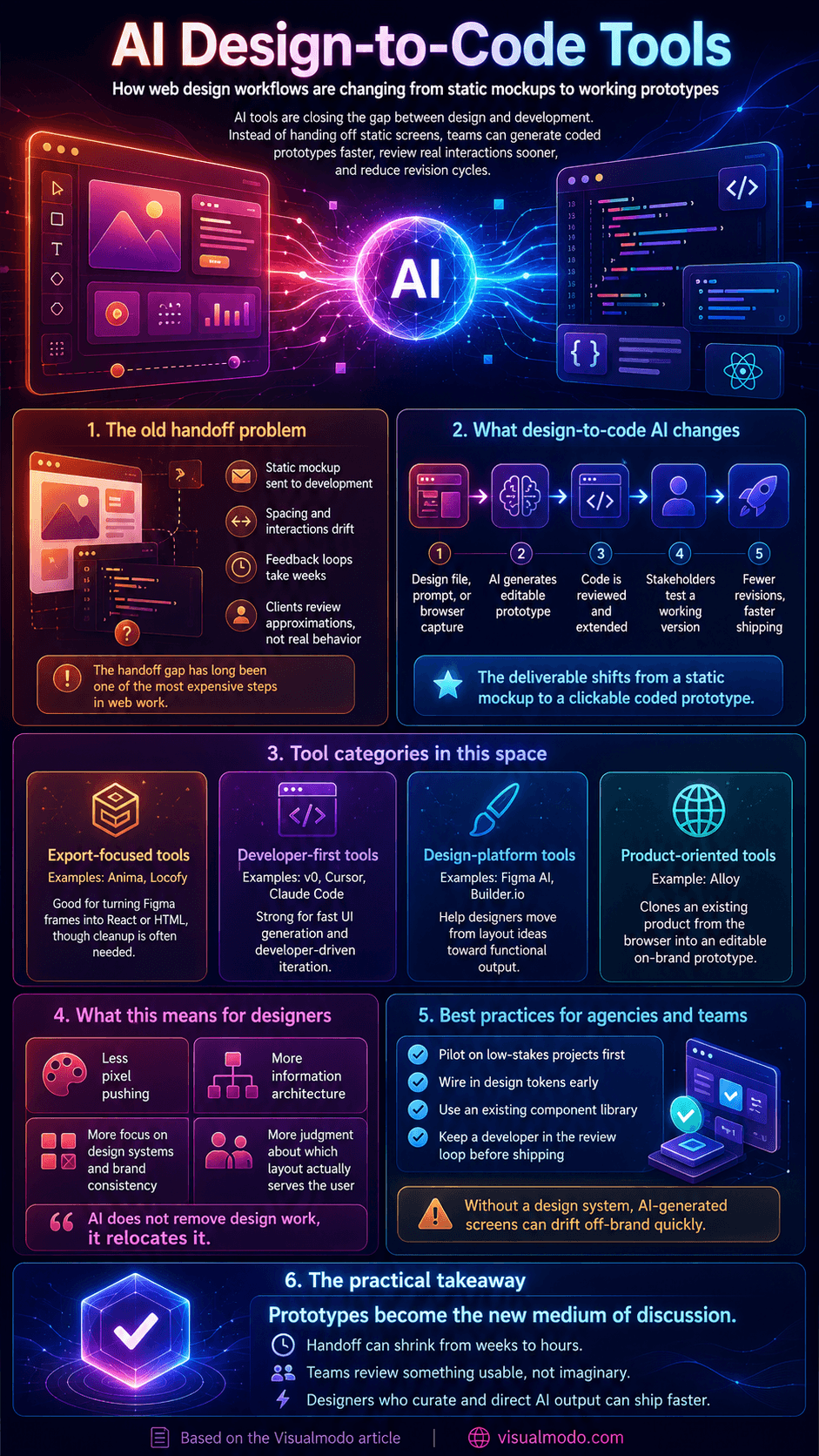
Every web designer knows the handoff problem. You spend days perfecting a mockup, send it to development, and what comes back weeks later is an approximation: spacing is off, interactions feel different, and the review cycle starts again. The gap between design and production code has been the most expensive step in web work for two decades, and it is finally starting to close.
From static mockup to working code
The first generation of design-to-code tools, such as Anima and Locofy, focused on exporting Figma frames into React or HTML components. Useful, but the output usually needed heavy cleanup before it could ship. The newer wave works differently: instead of translating layers one-to-one, these tools can clone a website or web app you already have, generate functioning prototypes from prompts or captures, and produce code a developer can actually extend.
That shift changes what a “design deliverable” is. A static mockup asks the client to imagine how the product will feel. A clickable, coded prototype removes the imagination step entirely, and teams report far fewer revision rounds when stakeholders review something they can use.
Who is building in this space
The category has become crowded fast, and the tools have sorted themselves by audience. Vercel’s v0 generates UI from text prompts and speaks to developers. Figma’s AI features and Builder.io approach the problem from the design-platform side. Claude Code and Cursor are powerful but assume you are comfortable running a developer environment.
The gap in the middle product managers and founders who are not engineers is where Alloy has planted its flag. Founded by former Atlassian product manager Simon Kubica with Christian Iacullo, the Sydney-based startup takes a different starting point: instead of prompting from a blank page, you capture your existing product from the browser and Alloy clones it into an editable, on-brand prototype. Sessions run as cloud agents rather than on your laptop, so a non-technical PM can kick one off from Slack, run several in parallel, and push the result to a GitHub pull request without ever touching a local environment. The approach earned the company a place in Y Combinator and a $3.5 million seed round from Blackbird Ventures and Bain Capital Ventures.
What this means for working designers
None of this eliminates design work; it relocates it. When a tool can produce a competent first draft of a screen in seconds, the value shifts to the judgment layers: information architecture, design systems, brand expression, and knowing which of five plausible layouts actually serves the user. The tools that respect an existing component library, rather than pasting screenshots and generating off-brand work, are the ones agencies can actually put in front of clients.
There are real caveats. Generated code varies in quality, and without a design system as the source of truth, AI-produced screens drift off-brand quickly. Agencies adopting these tools successfully pilot them on low-stakes projects first, wire in their design tokens early, and keep a developer in the review loop before anything ships.
What to check before rolling any of these tools into a real workflow
The article’s own caveat, that generated code drifts off-brand without a design system as the source of truth, is worth turning into a concrete checklist before a team commits to any of these tools.
Confirm the tool can actually read and respect an existing design token system or component library, rather than generating visually similar but structurally disconnected output. This is the single biggest differentiator between a tool that produces usable code and one that produces something that merely looks right in a screenshot. Ask specifically how generated code is reviewed before shipping, since even the most capable current tools produce output that varies in quality and needs a developer in the loop, a point the article makes correctly but doesn’t turn into a process recommendation. For teams choosing between developer-facing tools like v0 and Cursor versus product-facing tools aimed at non-engineers, the right fit depends on who’s actually driving the majority of prototyping work day to day, not which tool has the most impressive demo. Visualmodo’s guide to choosing a scalable software development partner covers a closely related evaluation framework worth applying here: piloting on a low-stakes project first, and confirming the tool or partner fits your specific team structure before a larger rollout.
The practical takeaway
Design-to-code AI is past the demo stage. Whether your team leans developer (v0, Cursor), designer (Figma), or product (Alloy), the workflow change is the same: prototypes become the medium of discussion, handoff shrinks from weeks to hours, and designers who curate and direct AI output ship faster than those producing every pixel by hand. If you have not run one client project through one of these tools yet, this is the year to try.
AI design-to-code FAQ
Yes. Even the most capable current tools produce output that varies in quality and can drift off-brand without a design system as the reference point. Treating generated code as a strong first draft rather than production-ready output, with a developer reviewing before anything ships, remains standard practice.
Developer-facing tools like Vercel’s v0 and Cursor assume comfort with a code environment and are built for engineers extending or refining generated output directly. Product-facing tools are built for non-engineers, letting a product manager or founder generate and iterate on a working prototype without needing to run a local development environment.
The tools that succeed at this connect directly to an existing design token system or component library rather than generating visually similar but structurally disconnected output from scratch. Confirming this integration exists, rather than assuming it, is worth checking before adopting any specific tool.
Infographic