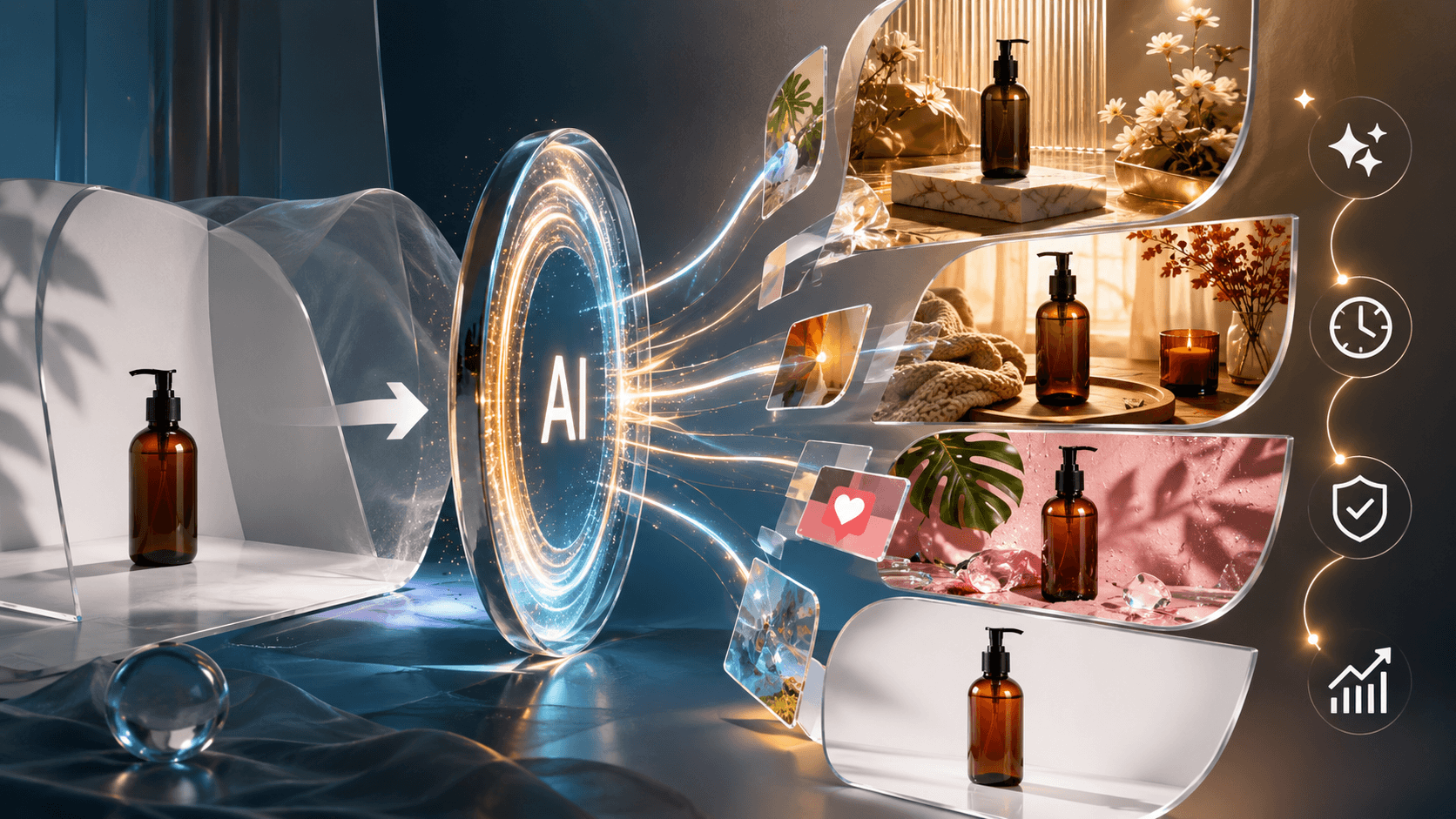
Shoppers make decisions in a split second. When they land on your store, the first thing they see is the product photo. If the image looks blurry or cheap, they will leave. High quality visuals are the secret to keeping people on your page. AI tools now allow brands to create professional photos without spending a fortune. AI tools now let you put your items in any environment you can imagine. This technology helps you tell a story that connects with your customers.
Editing photos used to take hours of manual work in complex software. Now, anyone can get professional results with just a few clicks. If you need to fix a background or remove a shadow, a free AI image editor is the best place to start. These tools help you maintain a clean look across your entire catalog. Consistency is key to building a brand that people recognize and trust. You do not need a massive budget to compete with the biggest names in your industry.
Scenario 1: The Small Business Launch
Imagine a small jewelry brand starting out in a home office. They have beautiful handmade necklaces but no money for a professional photographer. They need photos that look expensive to attract customers who value quality. If they take photos on a kitchen table, the items look cheap. The lighting might be yellow or the background might be distracting. This is a common problem for new sellers who want to look professional from day one.
By using AI, this brand can take a simple photo with a smartphone and transform it. They can place the necklace on a marble countertop or a velvet cushion. The AI handles the shadows and reflections so the product looks like it belongs in the scene. This allows a one person team to create a catalog that looks like it cost thousands of dollars to produce. Jewelry is worth extra care here specifically: metal tone and gemstone color are exactly the details AI lighting adjustments can shift without anyone noticing until a customer compares the photo to what arrived. It levels the playing field for small businesses, as long as the necklace in the photo is still the necklace in the box.
Benefits for Small Businesses
Cost is the biggest hurdle for new brands. Hiring a photographer, renting a studio, and buying props adds up quickly. AI removes these costs almost entirely. You only need your product and a phone. Speed is another major benefit. You can go from a raw photo to a finished marketing asset in minutes. This means you can test new products faster and see what your customers like.
The ability to scale is also important. As your business grows, you will have more products to manage. AI tools allow you to process hundreds of images in the time it used to take to do one. You can keep your website updated without waiting for a scheduled photoshoot. This keeps your store looking fresh and relevant to your audience.
Scenario 2: Seasonal Marketing Campaigns
A home decor brand needs to update its website for the winter holidays. They want to show their lamps and rugs in a cozy, festive setting. In the past, they would have to ship their products to a studio months in advance. They would need to hire a set designer to build a living room with a fireplace and a Christmas tree. This process is slow, expensive, and hard to change if the photos do not turn out right.
With AI, the brand can take their existing product photos and swap the backgrounds. They can place a lamp in a sunlit room for summer and then move it to a snowy cabin setting for winter. They do not have to move the physical product at all. This flexibility allows them to react to trends and holidays instantly. If a sudden cold snap happens, they can update their homepage with winter themes in one afternoon.
Benefits for Seasonal Marketing
Flexibility is the main advantage here. You can change your entire brand look to match the season without any physical labor. This helps you stay relevant to what your customers are thinking about. If it is back to school season, you can put your products in a classroom or dorm room setting. If it is Valentine Day, you can add romantic colors and textures.
Contextual selling is another benefit. People are more likely to buy a product when they see it in a setting they recognize. A blanket looks more comfortable when it is draped over a couch next to a warm fire. AI allows you to create these emotional connections by placing your products in relatable scenes. You can show your customers exactly how the product will fit into their lives.
Scenario 3: Social Media Content Creation
Social media managers need new content every single day to stay visible. They cannot wait for a monthly photoshoot to get new images for Instagram or TikTok. If they post the same white background photo every day, their followers will get bored. They need variety to keep people engaged. They need lifestyle shots that show the product being used in different places.
AI lets them generate a variety of lifestyle images from a single product shot. They can show a water bottle at a gym, then at a beach, and then on an office desk. This variety keeps the social media feed looking interesting. It also allows the manager to target different groups of people. They can post a gym photo to reach fitness fans and an office photo to reach professionals.
The same question, what’s actually being altered versus just presented differently, comes up across most AI image tools used on social platforms, including AI face swap tools, where the ethical and disclosure lines are more clearly drawn than most people realize.
Benefits for Social Media
Engagement is the goal of social media. Photos that look like real life perform better than standard product shots. AI helps you create these realistic scenes quickly. You can also experiment with different styles to see what gets the most likes and comments. If your audience loves bright colors, you can adjust your AI settings to produce more vibrant images.
Consistency across platforms is also easier with AI. You can make sure your photos have the same tone and feel on your website, your emails, and your social media pages. This helps people recognize your brand instantly. When your images look professional and consistent, people are more likely to trust your brand and click the buy button.
Practical Workflow for AI Product Images
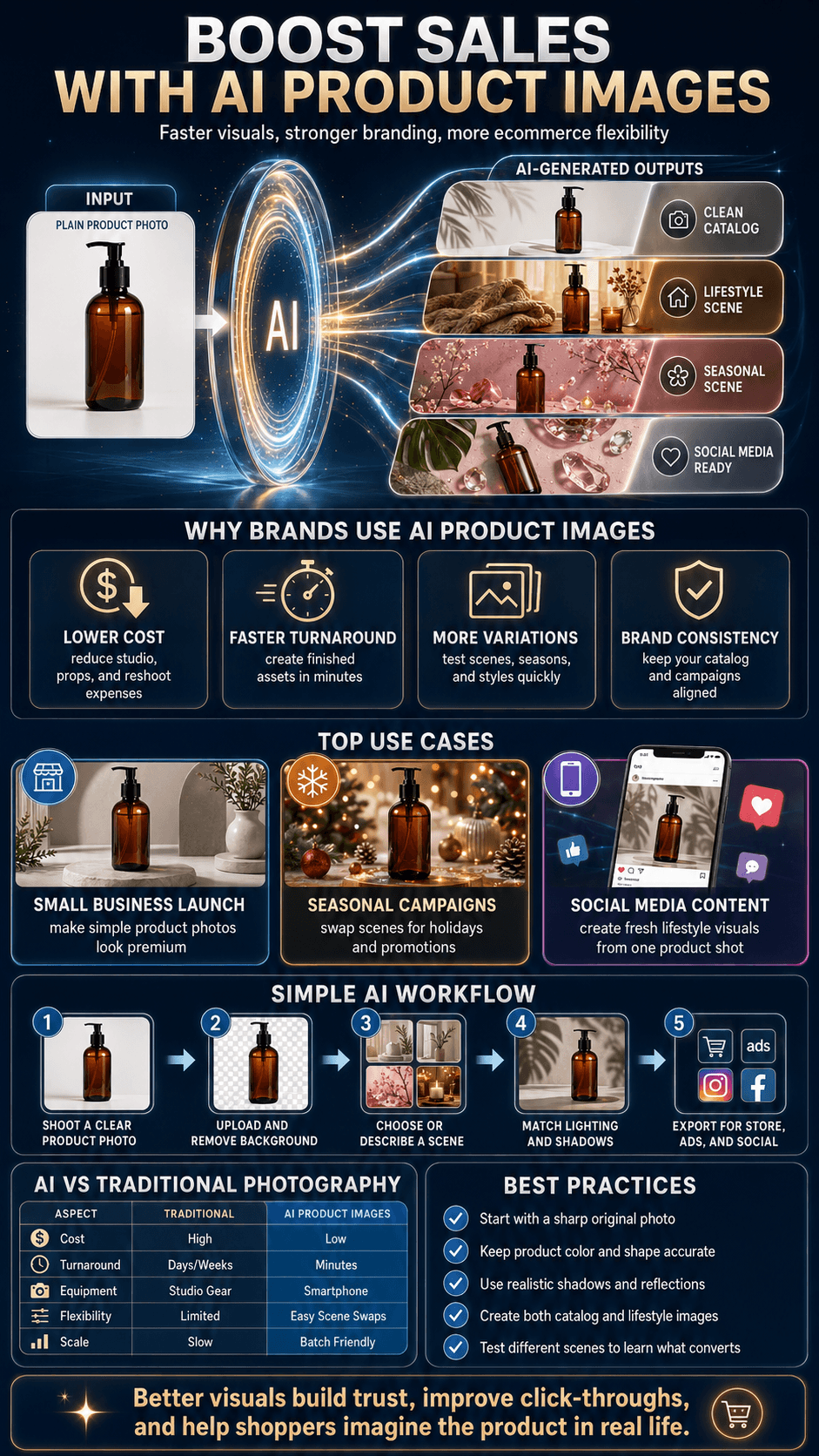
Getting started with AI photography is simple. You do not need to be a tech expert to get great results. Follow these steps to transform your product photos.
1. Take a clear photo of your product. Use natural light if possible and place the item on a plain surface. Make sure the product is in focus and not blocked by other objects.
2. Upload your photo to an AI tool. Most tools will automatically remove the original background for you. This gives you a clean cutout of your product to work with.
3. Choose a background or describe a scene. You can select from a library of pre made rooms or type a description of what you want. You might ask for a modern kitchen or a wooden table in a garden.
4. Adjust the lighting and shadows. The AI will usually do this for you, but check the result against your original photo before moving on: does the product’s actual color still match? AI lighting adjustments that make a scene look cohesive can also subtly shift how a product’s real color reads, which is the single most common way an otherwise great AI image ends up misrepresenting what you’re selling.
5. Save and export your image. Choose the right size for your website or social media platform. You now have a professional lifestyle photo ready to use.
The same accuracy-versus-polish tradeoff shows up any time a product image has to work across multiple contexts, not just e-commerce listings. How to Turn App Store Images Into a Clear Product Story covers it from a different angle worth comparing against.
| Feature | Traditional Photography | AI Product Photography |
| Average Cost | Hundreds to thousands per session | Low monthly fee or free |
| Turnaround Time | Days or weeks | Seconds or minutes |
| Equipment Needed | Pro camera, lights, backdrops | Smartphone |
| Flexibility | Hard to change after the shoot | Unlimited background changes |
| Skill Level | High technical knowledge | Basic computer skills |
| Accuracy Risk | Low, the camera captures the real product | Requires a manual check, lighting and color adjustments can drift from the real product |
What AI Can Change and What It Shouldn’t
All three scenarios above rely on the same underlying rule, even if none of them state it directly: AI should change the environment around a product, not the product itself.
Swapping a plain background for a marble countertop, a snowy cabin, or a sunlit kitchen is squarely in bounds. Changing the product’s actual color, size, texture, or included accessories to make it look better than it really is isn’t a style choice; it’s the kind of material misrepresentation the FTC’s own small business advertising guidance treats as deceptive, whether or not AI was involved in making the image. A necklace photographed on a velvet cushion is fine. A necklace whose actual metal tone got shifted brighter by the same edit is a returns problem waiting to happen, and potentially a compliance one too.
The practical test worth applying before publishing any AI-generated product image: would a customer, holding the real product next to this photo, feel misled about anything other than the setting? If the answer is no, the image is doing its job. If the answer is yes, even a small yes, that’s the line to pull back from, regardless of how much better the “enhanced” version looks.
Tools built specifically around staging, AI Product Staging is one example, are designed around exactly this boundary: they’re built to change what’s around the product, not the product itself, which is the right category to be shopping in if accuracy matters as much as it should.
Conclusion
AI is changing the way e-commerce brands think about their visual content. It removes the barriers of cost and time that used to hold small businesses back. You can now create a world class shopping experience with just a few tools and a little creativity. High quality images lead to higher conversion rates, and accurate images reduce returns specifically because customers know exactly what they are getting. That second part only holds if the AI-generated image doesn’t change the product itself, altering color, scale, texture, or included accessories tends to increase returns, not decrease them, since it sets an expectation the actual product doesn’t meet.
If you want to grow your sales, you must focus on your photos. Use AI to create variety, build trust, and show your products in the best possible light. The technology is here to stay, and the brands that use it will have a major advantage. Start experimenting with AI today and watch how it transforms your brand image and your bottom line. Your customers are waiting to see your products in a whole new way.
Treated well, product imagery is one piece of a larger conversion strategy, not a standalone fix, and how UX design and site architecture shape e-commerce SEO is a useful next read for anyone thinking about what comes after the photos are right.
Frequently Asked Questions About AI Product Images
Yes, using AI to generate backgrounds, lighting, or staging around a real product photo is legal and common. It becomes a problem under FTC truth-in-advertising rules only when the AI changes the product itself in ways that misrepresent what a customer will actually receive.
Technically yes, but doing so for a live product listing risks running into FTC deceptive advertising rules, since the product image needs to accurately represent what the buyer will receive. Changing the scene around the product is fine; changing the product’s real characteristics isn’t.
Current FTC guidance focuses on whether the image is materially accurate rather than requiring a blanket disclosure label on every enhanced photo, though this is an evolving area, and some newer rules go further for AI-generated people appearing in ads specifically.
Only if they’re accurate. Professional, well-lit images of a product that looks the way it actually looks tend to reduce returns. Images where AI has shifted the product’s real color, scale, or texture tend to increase returns, since the customer receives something that doesn’t match what they saw.
Staging changes the environment around the product, background, lighting, props, without touching the product itself. Alteration changes the product’s actual appearance, its color, size, texture, or included items. Staging is standard practice; alteration risks misrepresenting what’s for sale.
Yes. Every workflow described in this guide starts from an actual photo of the real product. AI tools change the scene around that photo, they don’t manufacture a product image from nothing while staying accurate to what you’re actually selling.
Infographic