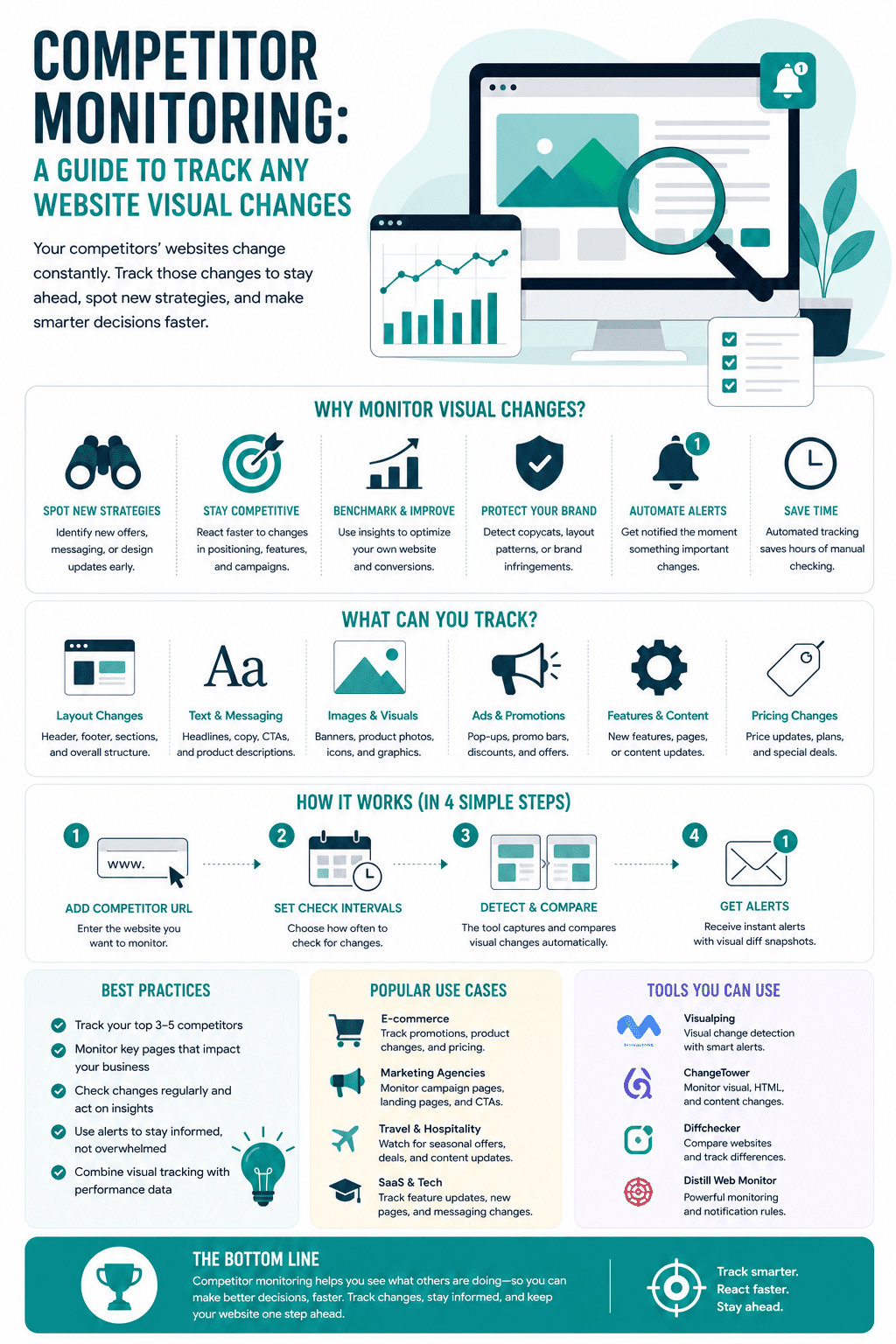
Competitor monitoring, here is a guide to tracking any website visual changes; Keeping tabs on your competitors is one of the most important things you should do as an online marketer. After all, you want to be aware of what activities are working for them and which aren’t to be able to apply them to your strategies.
For example, let’s say you run a company that makes miniature houses. You discover that your competitor recently rolled out several new products in your same niche; except theirs cost less to produce. Unfortunately, if you don’t monitor their website regularly, you won’t find out quickly enough to react.
You can now automate the process instead of checking your competitors’ websites regularly, saving time and money. In addition, you can accomplish competitor monitoring in many ways, and in this article, we’ll discuss how to monitor your competitors.
Why Is Competitor Monitoring Important?
You should monitor your competitors to know what strategies are working for them and what campaigns are bringing in the most profit. This information is precious because it can help you improve your business plan.
As you observe when your competitors are making changes to their websites, you might also be able to determine the reasons behind those changes. For example, suppose you notice that your competitor is updating their homepage or changing the wording on their product descriptions. In that case, you can ask yourself why they’re making these changes and what they hope to accomplish by making them. For example, perhaps they have gathered customers’ feedback on their messaging to resonate with them.
When you’re able to track the critical visual changes your competitors make to their websites; you’ll be able to react to them quickly. Notice that your competitor is beginning to dominate the search engines, for instance. You’ll be able to make adjustments to your SEO strategies.
What Can You Learn From Competitors?
Using monitoring tools, you can learn many things from your competitors and find some gaps in your industry. You can also use competitor data to eliminate ineffective methods from your marketing plan.
For instance, if you know that your competitor uses specific tactics to attract visitors and new customers, you can adopt the same strategies in your marketing efforts or find more innovative ways to achieve better results.
The full scope of competitor monitoring: visual is just one layer
Visual changes are the most obvious thing to track. A redesigned homepage or a new pricing structure shows up immediately as a screenshot comparison. But visual tracking is only one layer of competitor intelligence, and many of the most strategically important changes your competitors make are not visual at all.
Here is a broader view of what comprehensive competitor monitoring looks like in practice:
Messaging and positioning changes
When a competitor rewrites their homepage headline or changes the language in their value proposition, they are typically responding to something customer feedback, a new market positioning study, or a campaign test that showed what resonates. Tracking these changes over time helps you see how their understanding of their customers is evolving.
Pricing and offer structure
Competitors adjust prices, add tiers, bundle differently, or run time-limited promotions. Catching these changes early gives you data for your own pricing decisions and time to respond before the change has affected your pipeline.
SEO and content strategy signals
When a competitor publishes a new cluster of content, starts targeting new keywords, or restructures their blog, they are usually signaling a strategic move toward a market segment they want to capture. Monitoring their content output, even at a page-level, gives you early visibility into where they are building authority.
Technology and integration changes
The tools and integrations a competitor adds to their website, often visible through script tags or footer changes, can reveal new directions in their product stack, advertising strategy, or customer data approach.
Job posting patterns
Job pages are one of the most reliable signals of a company’s near-term priorities. A competitor posting for a sales engineering team it did not have before is signaling a move upmarket. A wave of new marketing hires often precedes a campaign push. Monitoring these pages takes a different mindset than visual tracking, but it belongs in the same intelligence workflow.
Understanding how to combine website traffic analysis tools with visual change monitoring gives you a significantly more complete picture of what your competition is doing and why.
How To Track Competitors’ Visual Changes?
One of the simplest ways to keep tabs on your competitors is to track the visual changes they make to their websites. Visualizing is a widely used website change monitoring tool that helps you automate this process. The software is straightforward to use: you need to introduce the URL of the page and select the area you are interested in tracking.
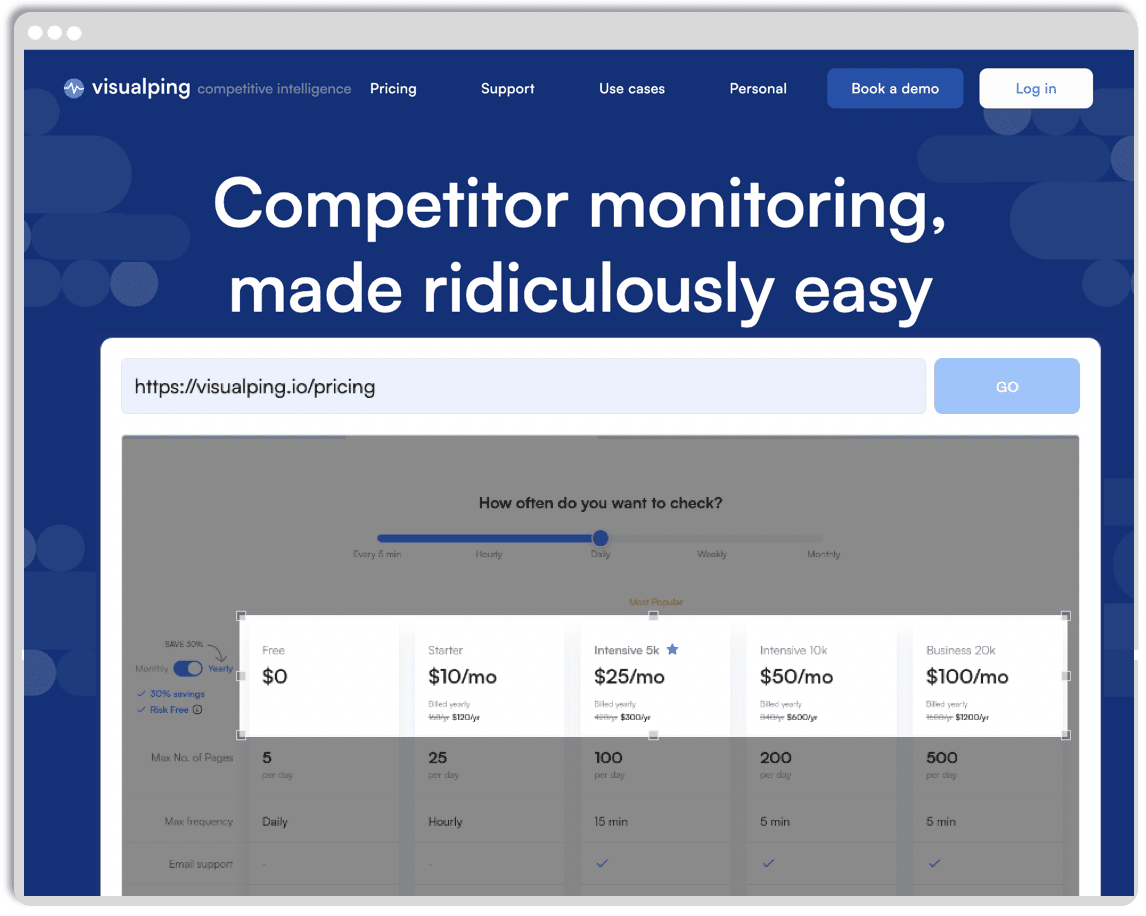
Visualizing keeps a copy of all the different versions, so you will always know what your competitors have changed.
Website change monitoring tools: what to consider before choosing
Visualping is the tool this article focuses on, and for good reason — it is one of the most accessible entry points for visual change monitoring. But understanding what other tools exist helps you choose the right approach for your team’s needs.
Visualping
Best for teams that want a lightweight, visual-first monitoring setup. You enter a URL, select a region of the page to track, and receive notifications when the screenshot changes. The free tier allows a limited number of tracked pages with weekly checks. Paid plans allow more frequent monitoring and tracking of more pages. Its main limitation is that it is visual only — it won’t alert you to changes in page source, pricing logic, or linked data that do not appear visually.
Hexowatch
Covers a broader range of monitoring types: visual, HTML, keyword, technology, and uptime. If you need more than screenshot comparisons, for instance, detecting when a specific word appears or disappears on a competitor’s page, or when a tech stack changes, Hexowatch handles that in a single platform.
Wachete
Particularly useful for tracking structured data on competitor pages, such as price changes on product listings or availability updates. Works well for e-commerce competitor monitoring where the specific data point matters more than the visual layout.
Crayon and Klue
Enterprise-level competitive intelligence platforms that go far beyond website changes. They aggregate signals across blog posts, job listings, review platforms, press releases, and more. These are the platforms marketing and product teams at mid-to-large companies use when competitive intelligence is a continuous workflow rather than an occasional check.
The right choice usually comes down to scope and team size. A small agency tracking five clients’ competitors needs something different from a 50-person marketing team building a systematic intelligence program.
For a wider view of how these tools fit into a comprehensive marketing strategy, combining website change monitoring with SEO rank tracking and traffic analysis gives you the most complete competitive picture available without talking to competitors directly.
According to Semrush’s guide to competitor monitoring tools, the most effective monitoring setups combine automated change alerts with regular manual review, since automated tools catch changes but human judgment determines which changes are worth responding to.
What visual changes can you track on your competitors’ websites?
You can track several different visual changes to be on top of your competitors’ moves:
- Homepage changes: messaging, design layout, hero section copy, and CTAs.
- Product pages: prices, product imagery, and descriptions.
- Pricing tables, deals, and promotion pages.
- Social media profiles: bios, images, and pinned posts.
- New product reviews on third-party platforms.
- Company pages: job postings, new team members, acquisitions, and announcements.
What to do when you spot a change turning intelligence into action
Monitoring tools tell you that something changed. They do not tell you why it changed or what you should do about it. That interpretive step is where most monitoring programs stall.
Here is a practical framework for what to do when a competitor change appears in your alerts.
Step 1: Verify it is intentional.
Websites experience unintentional changes all the time, from plugin updates, cache issues, or staging environment leaks. Before reacting to a change, check whether it persists across multiple visits and multiple devices. A pricing change that disappears when you reload the page in a different browser is probably a test or a technical glitch, not a policy shift.
Step 2: Categorize the change.
Not every change warrants a response. Group changes into:
- Strategic signals (new positioning, new target audience, new feature emphasis)
- Tactical moves (promotional pricing, new CTA, updated guarantee)
- Operational updates (new team member listed, minor copy correction, legal page update)
Strategic signals deserve attention from leadership. Tactical moves may require a rapid response from marketing. Operational updates usually require no response at all.
Step 3: Assess the potential impact on your position.
A competitor lowering a price you have matched for two years is a different situation from a competitor changing their hero image. For each significant change, ask: could this affect our win rate, our customer retention, or our search visibility? If the answer is yes to any of these, it warrants a formal team review.
Step 4: Decide whether to respond, monitor further, or document and move on.
Not every competitor move requires a countermove. Sometimes the best response to a competitor’s pricing change is to improve your own onboarding. Sometimes the right response to a redesigned competitor landing page is to accelerate your own conversion rate testing. The goal of competitor monitoring is better decisions, not reflexive mimicry.
For teams already running landing page optimization, knowing that a competitor just redesigned their equivalent page is a useful input into your own testing queue rather than a reason to copy their layout.
Step 5: Log and share the finding.
A competitor change that gets noticed but not recorded helps no one. The teams most effective at competitor monitoring maintain a simple log: date, URL, what changed, categorization, and any decision made. Over time, this log reveals patterns in a competitor’s behavior that individual alerts never show.
Building a monitoring workflow that actually runs consistently
The biggest reason competitor monitoring programs fail is not tool selection. It is consistency. Most teams set up tracking enthusiastically and then stop reviewing alerts because the workflow was never systematized.
Here is a minimal but functional monitoring workflow that works for solo practitioners, small teams, and agencies managing multiple clients.
Define your monitoring tier for each competitor.
Not all competitors deserve the same monitoring investment. Tier 1 competitors (your direct, closest rivals) warrant daily or near-daily monitoring of their homepage, pricing page, and key product or service pages. Tier 2 competitors (adjacent players or aspirational rivals) might be checked weekly. Tier 3 (market participants you watch but rarely compete with directly) can be reviewed monthly.
Select three to five pages per competitor to monitor actively.
Focus on the pages that change with strategic intent: homepage, primary product or service page, pricing page, and one campaign landing page if visible. Spreading monitoring too wide produces alert volume that no one reads.
Set an alert frequency that matches the stakes.
For Tier 1 competitors where a pricing change could affect active deals in your pipeline, daily alerts make sense. For broader brand and messaging monitoring, weekly or bi-weekly is usually sufficient without creating alert fatigue.
Assign a team owner for review.
Alerts that land in a shared inbox with no owner get ignored. Someone specific needs to be responsible for reviewing the week’s alerts, categorizing them, and bringing relevant ones to a standing competitive review.
Schedule a monthly competitive review.
Once a month, collect all the categorized changes from the past four weeks and review them together as a team. Look for patterns. Did a competitor just redesign three pages in a row? That often signals a broader rebrand or messaging shift. Did they change their pricing structure and then update their homepage headline two weeks later? That sequence reveals a repositioning in progress.
Combining this visual and structural monitoring with data on traffic and search visibility gives you the most complete picture of whether a competitor’s changes are actually working.
Summary
If you are looking for a simple tool to monitor your competition, Visualping will be a great choice. First, you need to set up the pages you want to track, and it will send you a notification every time there is a change. As a result, your business will not only save time and money, but you will also be on top of the changes as soon as they happen, giving you a unique advantage to react.
Competitor website monitoring FAQ
For your most direct competitors, automated monitoring with daily or near-daily checks on key pages is the most reliable approach. Manual checks done inconsistently tend to miss important windows. For less direct competitors, weekly monitoring is usually sufficient. The goal is to catch strategically significant changes quickly enough to respond, not to watch every minor update.
Most tools offer a limited free plan. Visualping’s free tier allows a small number of tracked pages with weekly monitoring intervals. Paid plans on most tools start between $10 and $30 per month and unlock more frequent checks and more pages. Enterprise-grade platforms like Crayon or Klue operate at a significantly higher price point and are typically used by dedicated competitive intelligence teams.
Yes. Several website monitoring tools, including Visualping, can monitor URLs that include social media profile pages. This lets you detect changes in a competitor’s bio, pinned posts, cover image, or follower count context. Dedicated social monitoring tools go further, tracking mentions, engagement trends, and hashtag use across multiple platforms simultaneously.
Visual monitoring takes periodic screenshots of a page and alerts you when the visual output changes. HTML monitoring checks the underlying code of the page and alerts you when the source changes, even if the change is not visible to a normal user. Visual monitoring is better for catching design and messaging changes. HTML monitoring is better for detecting structural changes, hidden pricing logic, or technology stack updates that may not affect the visible page.
Most practitioners recommend monitoring three to five competitors in depth rather than tracking a large number superficially. For each competitor you actively monitor, identify the five to eight pages most likely to signal strategic shifts: homepage, pricing, key product or feature pages, and any active campaign landing pages. Breadth creates alert noise. Depth creates usable intelligence.
No. Monitoring competitor websites is a standard research practice and has no direct effect on your own search performance. The opposite is true: being aware of what competitors are doing with their content, site structure, and keyword targeting helps you make better-informed decisions about your own SEO investment. What you do with competitive intelligence is your own strategic choice.
Infographic