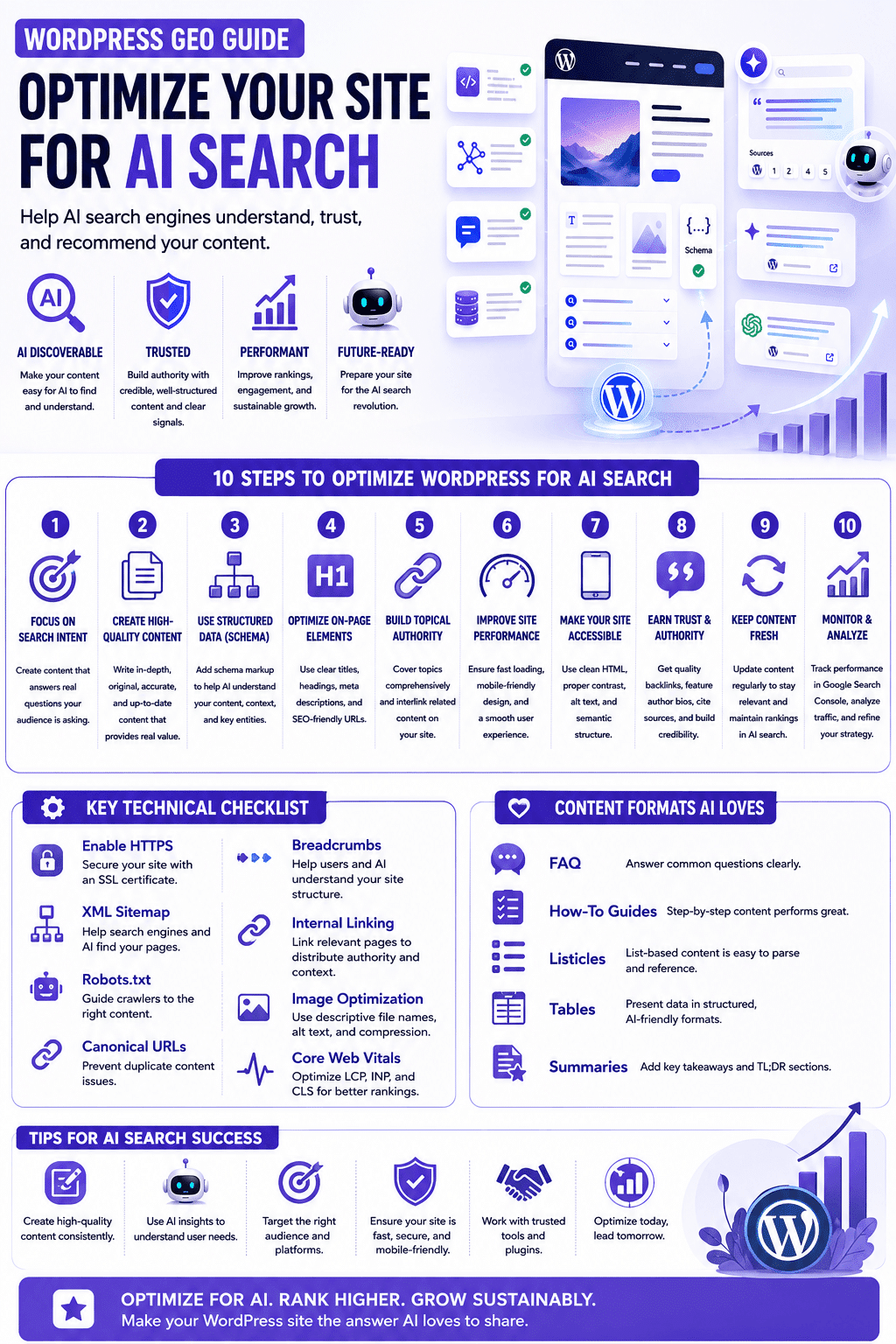
For twenty years, optimizing a WordPress site meant one thing: pleasing Google. In 2026, a fast-growing share of your potential visitors never touches a search results page at all. They ask ChatGPT for the best tool, let Perplexity do the comparison shopping, and trust whatever Gemini summarizes. If your WordPress site isn’t optimized for these AI systems, you’re invisible to that entire audience no matter how good your classic SEO is.
The discipline that fixes this is called generative engine optimization (GEO), and the good news is that WordPress is one of the easiest platforms to do it on. Here’s a practical, no-fluff checklist you can work through in an afternoon.
1. Make sure AI crawlers can reach you at all
Start with the basics: check your robots.txt. AI crawlers identify themselves with user agents like GPTBot (OpenAI), PerplexityBot, ClaudeBot (Anthropic), and Google-Extended (Gemini). Many security and caching plugins and some hosts block unknown bots by default, which quietly removes you from every AI answer. Decide deliberately which crawlers you welcome, and verify that your firewall (Cloudflare, Wordfence, and similar) isn’t challenging them with CAPTCHAs they can never solve.
One nuance worth getting right: GPTBot isn’t OpenAI’s only crawler, and treating it as the whole story misses the one that matters most for citations. According to OpenAI’s own crawler documentation, GPTBot collects content for model training, while a separate crawler, OAI-SearchBot, is what surfaces your pages in ChatGPT’s search results and citations. You can allow one without the other, a publisher that wants citation visibility without contributing to training data can block GPTBot while explicitly allowing OAI-SearchBot in robots.txt. For a GEO strategy specifically, OAI-SearchBot access matters more directly than GPTBot access.
2. Keep your content server-rendered
WordPress’s classic theme architecture is a hidden GEO advantage: pages arrive as complete HTML. Be careful with heavily JavaScript-dependent page builders and “headless” setups if key content only appears after client-side rendering, many AI crawlers will see an empty page. If you run headless WordPress, make server-side rendering non-negotiable.
3. Structure content the way language models quote it
AI assistants don’t rank pages; they extract answers. Content that gets cited shares a recognizable shape: a clear question or claim in a heading, followed by a direct, complete answer in the first sentence or two beneath it. Practical changes for your posts and pages: use one H1 and a logical H2/H3 hierarchy, open each section with the conclusion instead of building up to it, keep paragraphs short and self-contained, and use lists and tables for anything enumerable models love extracting structured comparisons.
Adding an FAQ section to key pages is the single highest-leverage habit. Real questions, answered in complete sentences, are exactly the format AI systems lift into their responses.
4. Use schema markup. WordPress makes it trivial
Structured data tells machines what your content is rather than making them guess. Most modern SEO plugins (Yoast, Rank Math, SEOPress) generate Article, Organization, FAQ, and Breadcrumb schema automatically but only if you configure them. Fill in your organization profile completely, enable FAQ and HowTo blocks where relevant, and validate the output with Google’s Rich Results Test. Schema won’t make weak content citable, but it removes every excuse a machine has to misunderstand strong content.
5. Say things worth quoting
GEO is not a purely technical game. Language models cite sources that make concrete, verifiable statements: numbers, comparisons, definitions, and first-hand experience. “We migrated 40 client sites and page weight dropped by an average of 38%” is citable; “we deliver blazing-fast websites” is not. Audit your cornerstone pages and replace vague marketing claims with specific ones. Original data even a small survey of your own customers dramatically raises how often AI systems reference you.
6. Don’t neglect the classics
Everything that made sites rank in traditional search still matters, because AI systems inherit those signals: crawlable architecture, descriptive title tags and meta descriptions, decent Core Web Vitals, HTTPS, and real backlinks from relevant sites. GEO builds on SEO; it doesn’t replace it. A site with zero authority won’t be cited no matter how well-structured it is.
If you’re not sure which of those classic signals is holding your site back, start with our WordPress SEO fixes in priority order. It covers indexing, thin URLs, Core Web Vitals, and theme markup before any GEO-specific work.
If your backlink profile is thin, building a modern link building strategy aligned with how Google, and by extension AI systems, actually value links is worth doing before chasing GEO-specific tactics, since authority signals compound across both channels.
7. Measure your AI visibility, then iterate
You can’t improve what you don’t measure, and this is where most WordPress owners are flying blind. Free audit tools such as GEO-Score score roughly a dozen to twenty AI-visibility signals in under a minute. Run one against your homepage and your most important landing pages before you change anything, work through what it flags, and re-run it afterward to confirm the fixes landed. Checking your competitors’ scores is instructive too: it shows you exactly how high the bar actually is in your niche.
An audit score tells you whether your pages are readable. It doesn’t tell you whether ChatGPT or Perplexity actually mention you. For that you need prompt tracking over time, and our guide to the best AEO tools compares what 20 platforms track and what each plan really costs.
The window is still open
Most WordPress sites haven’t done any of this yet. That’s the opportunity: while classic SEO is a saturated, decade-long grind, GEO in 2026 still rewards early movers disproportionately. An afternoon of structural fixes and a habit of writing quotable, concrete content can put an ordinary WordPress site ahead of far bigger competitors in the answers people actually read.
Frequently Asked Questions About WordPress GEO Optimization
GEO, or Generative Engine Optimization, is the practice of structuring a website so AI systems like ChatGPT, Perplexity, and Gemini can extract, understand, and cite its content directly in generated answers. It builds on traditional SEO rather than replacing it.
Mostly, yes, which makes WordPress a strong foundation for AI search optimization. Its classic theme architecture serves complete server-rendered HTML by default, exactly what AI crawlers need. The gaps are usually configuration: unblocked crawler access, configured schema, and content actually structured for extraction, not the platform itself.
No. Blocking GPTBot, ClaudeBot, or PerplexityBot has no effect on Googlebot or your Google rankings, since these are entirely separate crawlers controlled independently in robots.txt. It will, however, remove you from AI-generated answers on those platforms.
Structural changes like schema and FAQ formatting can affect citation eligibility within weeks, since AI systems recrawl frequently. Building the underlying authority that makes a site worth citing at all, real backlinks and demonstrated expertise, takes the same months-to-years timeline as traditional SEO always has. How early-stage companies are approaching this shift is a useful comparison for calibrating how aggressive to be.
That’s a real option if you don’t want your content used for model training, and it’s independent of your citation visibility. You can block GPTBot specifically while still allowing OAI-SearchBot, which controls whether ChatGPT can cite and link to your pages in search results.
No. Every classic ranking factor, crawlable architecture, Core Web Vitals, HTTPS, backlinks, still feeds AI visibility, since these systems inherit the web’s existing trust signals rather than building an entirely separate one. GEO adds requirements on top of SEO, it doesn’t substitute for it.
Check robots.txt for accidentally blocked AI crawlers first, it’s a five-minute check that silently removes sites from every AI answer when misconfigured. Adding one well-written FAQ section to your most important page is the next highest-leverage move.
If working through this checklist reveals more than an afternoon’s worth of fixes, comparing GEO agencies built for exactly this work is a reasonable next step rather than DIY-ing all of it.
Infographic